mirror of
https://github.com/admindroid-community/powershell-scripts.git
synced 2025-12-29 16:14:48 +00:00

16 lines
943 B
Markdown
16 lines
943 B
Markdown
## Export Shared Mailbox Permission Report to CSV using PowerShell
|
||
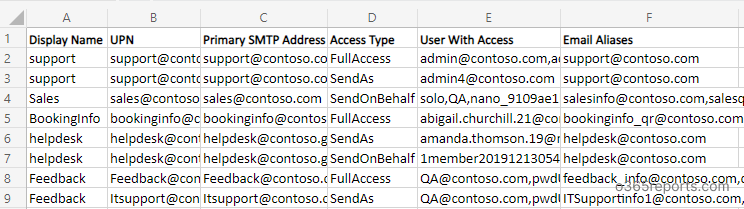
This PowerShell script exports Shared mailbox permission like full access, send as and send on behalf permissions to CSV file.
|
||
|
||
***Sample Output:***
|
||
|
||
The script exports an output CSV file that looks like the screenshot below
|
||
|
||
|
||
|
||
## Microsoft 365 Reporting Tool by AdminDroid
|
||
Take a closer look at [AdminDroid's Microsoft 365 reporting tool](https://admindroid.com/?src=GitHub), which offers an extensive array of over 1800 reports for gaining detailed insights and a comprehensive understanding of your M365 environment.
|
||
|
||
*Export Shared Mailbox Permissions to CSV using AdminDroid for detailed and actionable insights: <https://demo.admindroid.com/#/1/11/reports/10024/1/20?easyFilter=%7B%22IsInbuiltAccount%22%3A0%7D>*
|
||
|
||
|