mirror of
https://github.com/centminmod/my-claude-code-setup.git
synced 2025-12-17 15:36:53 +00:00

500 lines
36 KiB
Markdown
500 lines
36 KiB
Markdown
[](https://github.com/centminmod/my-claude-code-setup/stargazers) [](https://github.com/centminmod/my-claude-code-setup/network) [](https://github.com/centminmod/my-claude-code-setup/issues)
|
||
|
||
* Threads - https://www.threads.com/@george_sl_liu
|
||
* BlueSky - https://bsky.app/profile/georgesl.bsky.social
|
||
|
||
# My Claude Code Project's Starter Settings
|
||
|
||
My Claude Code project's starter settings and Claude Code hooks and slash commands are provided in this repository for users to try out. Be sure to read the official Claude Code docs first at https://docs.anthropic.com/en/docs/claude-code/overview and sign up for a [paid Claude AI account](https://claude.ai/) to use Claude Code. You can pay for Claude Pro $20/month, Claude Max $100/month or Claude Max $200/month. The paid Claude tier plans will include varying quotas for usage and rate limits outlined [here](https://support.anthropic.com/en/articles/9797557-usage-limit-best-practices).
|
||
|
||
1. Copy the files in this Github repo to your project directory (where you intended codebase will be).
|
||
2. Modify the template files and CLAUDE.md`to your liking. `.claude/settings.json` needs to install Terminal-Notifier for macOS https://github.com/centminmod/terminal-notifier-setup. If you're not using macOS, you can remove `.claude/settings.json`.
|
||
3. After launching Claude Code for the first time within your project directory, run `/init` so that Claude Code analyses your code base and then populates your memory bank system files as per CLAUDE.md` instructions.
|
||
4. Optional step highly recommended: Install Visual Studio Code ([beginners YouTube video guide](https://www.youtube.com/watch?v=rPITZvwyoMc) and [here](https://www.youtube.com/watch?v=P-5bWpUbO60)) and [Claude Code VSC Extension](https://marketplace.visualstudio.com/items?itemName=anthropic.claude-code).
|
||
5. Optional step highly recommended: Sign up for [Github.com](https://github.com/) account and install Git for Visual Studio Code. Checkout YouTube guides [here](https://www.youtube.com/watch?v=twsYxYaQikI) and [here](https://www.youtube.com/watch?v=z5jZ9lrSpqk).
|
||
6. CLAUDE.md updated to instruct models to use faster tools so for macOS: `brew install ripgrep fd jq`
|
||
7. Optional step to setup Claude Code, Codex GPT-5, Gemini CLI, OpenCode, Vercel CLI, Cloudflare Wrangler, Amazon AWS CLI, all in a single isolated [Visual Studio Code dev container running Debian 12](https://claude-devcontainers.centminmod.com/). Allowing you to run YOLO modes for Claude Code with `dangerously_skip_permissions` enabled and Codex CLI with `sandbox_mode = danger-full-access` etc.
|
||
8. Claude Code via Claude Desktop apps use Git Worktrees. You may need to create a `.worktreeinclude` file as outlined [here](https://code.claude.com/docs/en/desktop#claude-code-on-desktop-preview).
|
||
9. If you use Cloudflare and ClerkOS platforms in your apps, you can keep either `CLAUDE-cloudflare.md` or `CLAUDE-cloudflare-mini.md` supplementary reference docs and update `CLAUDE.md` referencing either file to help AI understand Cloudflare and ClerkOS platforum documentation and products. Edit documentation templates as needed i.e. if you do not use ClerkOS platform, you can remove those sections.
|
||
|
||
I also install the following MCP servers ([install commands](#claude-code-mcp-servers)):
|
||
|
||
* [Gemini CLI MCP](https://github.com/centminmod/gemini-cli-mcp-server)
|
||
* [Cloudflare Documentation MCP](https://github.com/cloudflare/mcp-server-cloudflare/tree/main/apps/docs-vectorize)
|
||
* [Context 7 MCP](https://github.com/upstash/context7)
|
||
* [Chrome Devtools MCP](https://github.com/ChromeDevTools/chrome-devtools-mcp)
|
||
* [Notion MCP](https://github.com/makenotion/notion-mcp-server)
|
||
* [Claude Code Usage Metrics MCP](https://github.com/centminmod/claude-code-opentelemetry-setup)
|
||
|
||
## Claude Code Skills
|
||
|
||
Claude Code now supports [Agent Skills](https://docs.claude.com/en/docs/claude-code/skills).
|
||
|
||
### claude-docs-consultant
|
||
|
||
- **Purpose**: A specialized Claude skill which will selectively consult the official Claude Code documentation from docs.claude.com using selective fetching. This skill will invoke only when working on Claude Code hooks, skills, subagents, MCP servers, or any Claude Code feature that requires referencing official documentation for accurate implementation. Fetches only the specific documentation needed rather than loading all docs upfront
|
||
|
||
## Claude Code Hooks
|
||
|
||
The Claude Code hook is for `STOP` which uses Terminal-Notifier to show macOS desktop notifications whenever Claude Code stops and finishes it's response https://github.com/centminmod/terminal-notifier-setup.
|
||
|
||
## Claude Code Subagents
|
||
|
||
Claude Code subagents are specialized tools designed to handle complex, multi-step tasks autonomously. A key benefit of Claude Code subagents is that uses its own context window separate from the main conversation and can use it's own custom prompt. Learn more about [subagents in the official documentation](https://docs.anthropic.com/en/docs/claude-code/sub-agents).
|
||
|
||
### memory-bank-synchronizer
|
||
|
||
- **Purpose**: Synchronizes memory bank documentation with actual codebase state, ensuring architectural patterns in memory files match implementation reality
|
||
- **Location**: `.claude/agents/memory-bank-synchronizer.md`
|
||
- **Key Responsibilities**:
|
||
- Pattern documentation synchronization
|
||
- Architecture decision updates
|
||
- Technical specification alignment
|
||
- Implementation status tracking
|
||
- Code example freshness validation
|
||
- Cross-reference validation
|
||
- **Usage**: Proactively maintains consistency between CLAUDE-*.md files and source code to ensure documentation remains accurate and trustworthy
|
||
|
||
### code-searcher
|
||
|
||
- **Purpose**: A specialized agent for efficiently searching the codebase, finding relevant files, and summarizing code. Supports both standard detailed analysis and optional [Chain of Draft (CoD)](https://github.com/centminmod/or-cli/blob/master/examples/example-code-inspection-prompts3.md) ultra-concise mode when explicitly requested for 80% token reduction
|
||
- **Location**: `.claude/agents/code-searcher.md`
|
||
- **Key Responsibilities**:
|
||
- Efficient codebase navigation and search
|
||
- Function and class location
|
||
- Code pattern identification
|
||
- Bug source location assistance
|
||
- Feature implementation analysis
|
||
- Integration point discovery
|
||
- Chain of Draft (CoD) mode for ultra-concise reasoning with minimal tokens
|
||
- **Usage**: Use when you need to locate specific functions, classes, or logic within the codebase. Request "use CoD", "chain of draft", or "draft mode" for ultra-concise responses with ~80% fewer tokens
|
||
- **Standard mode**: "Find the payment processing code" → Full detailed analysis
|
||
- **CoD mode**: "Find the payment processing code using CoD" → "Payment→glob:*payment*→found:payment.service.ts:45"
|
||
|
||
### get-current-datetime
|
||
|
||
- **Purpose**: Simple DateTime utility for accurate Brisbane, Australia (GMT+10) timezone values. Executes bash date commands and returns only the raw output without formatting or explanations
|
||
- **Location**: `.claude/agents/get-current-datetime.md`
|
||
- **Key Responsibilities**:
|
||
- Execute `TZ='Australia/Brisbane' date` commands
|
||
- Provide accurate Brisbane timezone timestamps
|
||
- Support multiple format options (default, filename, readable, ISO)
|
||
- Eliminate timezone confusion and month errors
|
||
- Return raw command output without additional processing
|
||
- **Usage**: Use when creating files with timestamps, generating reports with dates, or needing accurate Australian timezone values for any purpose
|
||
|
||
### ux-design-expert
|
||
|
||
- **Purpose**: Comprehensive UX/UI design guidance specialist combining user experience optimization, premium interface design, and scalable design systems with Tailwind CSS and Highcharts data visualization
|
||
- **Location**: `.claude/agents/ux-design-expert.md`
|
||
- **Key Responsibilities**:
|
||
- UX flow optimization and friction reduction
|
||
- Premium UI design with sophisticated visual hierarchies
|
||
- Scalable design systems architecture using Tailwind CSS
|
||
- Data visualization strategy with Highcharts implementations
|
||
- Accessibility compliance and performance optimization
|
||
- Component library design with atomic methodology
|
||
- **Usage**: Use for dashboard UX improvements, premium component libraries, complex user flow optimization, design system creation, or any comprehensive UX/UI design guidance needs
|
||
|
||
## Claude Code Slash Commands
|
||
|
||
### `/anthropic` Commands
|
||
|
||
- **`/apply-thinking-to`** - Expert prompt engineering specialist that applies Anthropic's extended thinking patterns to enhance prompts with advanced reasoning frameworks
|
||
- Transforms prompts using progressive reasoning structure (open-ended → systematic)
|
||
- Applies sequential analytical frameworks and systematic verification with test cases
|
||
- Includes constraint optimization, bias detection, and extended thinking budget management
|
||
- Usage: `/apply-thinking-to @/path/to/prompt-file.md`
|
||
|
||
- **`/convert-to-todowrite-tasklist-prompt`** - Converts complex, context-heavy prompts into efficient TodoWrite tasklist-based methods with parallel subagent execution
|
||
- Achieves 60-70% speed improvements through parallel processing
|
||
- Transforms verbose workflows into specialized task delegation
|
||
- Prevents context overflow through strategic file selection (max 5 files per task)
|
||
- Usage: `/convert-to-todowrite-tasklist-prompt @/path/to/original-slash-command.md`
|
||
|
||
- **`/update-memory-bank`** - Simple command to update CLAUDE.md and memory bank files
|
||
- Usage: `/update-memory-bank`
|
||
|
||
### `/ccusage` Commands
|
||
|
||
- **`/ccusage-daily`** - Generates comprehensive Claude Code usage cost analysis and statistics
|
||
- Runs `ccusage daily` command and parses output into structured markdown
|
||
- Provides executive summary with total costs, peak usage days, and cache efficiency
|
||
- Creates detailed tables showing daily costs, token usage, and model statistics
|
||
- Includes usage insights, recommendations, and cost management analysis
|
||
- Usage: `/ccusage-daily`
|
||
|
||
### `/cleanup` Commands
|
||
|
||
- **`/cleanup-context`** - Memory bank optimization specialist for reducing token usage in documentation
|
||
- Removes duplicate content and eliminates obsolete files
|
||
- Consolidates overlapping documentation while preserving essential information
|
||
- Implements archive strategies for historical documentation
|
||
- Achieves 15-25% token reduction through systematic optimization
|
||
- Usage: `/cleanup-context`
|
||
|
||
### `/documentation` Commands
|
||
|
||
- **`/create-readme-section`** - Generate specific sections for README files with professional formatting
|
||
- Creates well-structured sections like Installation, Usage, API Reference, Contributing, etc.
|
||
- Follows markdown best practices with proper headings, code blocks, and formatting
|
||
- Analyzes project context to provide relevant content
|
||
- Matches existing README style and tone
|
||
- Usage: `/create-readme-section "Create an installation section for my Python project"`
|
||
|
||
- **`/create-release-note`** - Generate comprehensive release documentation from recent commits with dual output formats
|
||
- Interactive workflow with two modes: by commit count or by commit hash range (last 24/48/72 hours)
|
||
- Produces customer-facing release note (value-focused, no technical jargon) and technical engineering note (SHA references, file paths)
|
||
- Comprehensive commit analysis with grouping by subsystem and traceability to specific SHAs
|
||
- Supports direct arguments for quick generation or interactive selection for precise control
|
||
- Usage: `/create-release-note` (interactive), `/create-release-note 20` (last 20 commits), or select commit hash after viewing recent commits
|
||
|
||
### `/security` Commands
|
||
|
||
- **`/security-audit`** - Perform comprehensive security audit of the codebase
|
||
- Identifies potential vulnerabilities using OWASP guidelines
|
||
- Checks authentication, input validation, data protection, and API security
|
||
- Categorizes issues by severity (Critical, High, Medium, Low)
|
||
- Provides specific remediation steps with code examples
|
||
- Usage: `/security-audit`
|
||
|
||
- **`/check-best-practices`** - Analyze code against language-specific best practices
|
||
- Detects languages and frameworks to apply relevant standards
|
||
- Checks naming conventions, code organization, error handling, and performance
|
||
- Provides actionable feedback with before/after code examples
|
||
- Prioritizes impactful improvements over nitpicks
|
||
- Usage: `/check-best-practices`
|
||
|
||
- **`/secure-prompts`** - Enterprise-grade security analyzer for detecting prompt injection attacks and malicious instructions
|
||
- Detects prompt injection attacks, hidden content, and malicious instructions using advanced AI-specific detection patterns
|
||
- Provides comprehensive threat analysis with automated timestamped report generation
|
||
- Saves reports to `reports/secure-prompts/` directory for audit trails
|
||
- Analyzes both file content and direct text input for security threats
|
||
- Usage: `/secure-prompts @suspicious_file.txt` or `/secure-prompts "content to analyze"`
|
||
- Example prompt injection prompts at `.claude/commands/security/test-examples` that you can run `/secure-prompts` against.
|
||
- Example generated report for `/secure-prompts .claude/commands/security/test-examples/test-encoding-attacks.md` [here](reports/secure-prompts/security-analysis_20250719_072359.md)
|
||
|
||
### `/architecture` Commands
|
||
|
||
- **`/explain-architecture-pattern`** - Identify and explain architectural patterns in the codebase
|
||
- Analyzes project structure and identifies design patterns
|
||
- Explains rationale behind architectural decisions
|
||
- Provides visual representations with diagrams
|
||
- Shows concrete implementation examples
|
||
- Usage: `/explain-architecture-pattern`
|
||
|
||
### `/promptengineering` Commands
|
||
|
||
- **`/convert-to-test-driven-prompt`** - Transform requests into Test-Driven Development style prompts
|
||
- Defines explicit test cases with Given/When/Then format
|
||
- Includes success criteria and edge cases
|
||
- Structures prompts for red-green-refactor cycle
|
||
- Creates measurable, specific test scenarios
|
||
- Usage: `/convert-to-test-driven-prompt "Add user authentication feature"`
|
||
|
||
- **`/batch-operations-prompt`** - Optimize prompts for multiple file operations and parallel processing
|
||
- Identifies parallelizable tasks to maximize efficiency
|
||
- Groups operations by conflict potential
|
||
- Integrates with TodoWrite for task management
|
||
- Includes validation steps between batch operations
|
||
- Usage: `/batch-operations-prompt "Update all API calls to use new auth header"`
|
||
|
||
### `/refactor` Commands
|
||
|
||
- **`/refactor-code`** - Analysis-only refactoring specialist that creates comprehensive refactoring plans without modifying code
|
||
- Analyzes code complexity, test coverage, and architectural patterns
|
||
- Identifies safe extraction points and refactoring opportunities
|
||
- Creates detailed step-by-step refactoring plans with risk assessment
|
||
- Generates timestamped reports in `reports/refactor/` directory
|
||
- Focuses on safety, incremental progress, and maintainability
|
||
- Usage: `/refactor-code`
|
||
|
||
## Claude Code Plan Weekly Rate Limits
|
||
|
||
If you are using Claude monthly subscription plans for Claude Code, new weekly rate limits will apply from August 28, 2025 in addition to max 50x 5hr session limits per month:
|
||
|
||
| Plan | Sonnet 4 (hrs/week) | Opus 4 (hrs/week) |
|
||
|--------------------|---------------------|-------------------|
|
||
| Pro | 40–80 | – |
|
||
| Max ($100 /mo) | 140–280 | 15–35 |
|
||
| Max ($200 /mo) | 240–480 | 24–40 |
|
||
|
||
## Claude Code settings
|
||
|
||
> Configure Claude Code with global and project-level settings, and environment variables.
|
||
|
||
Claude Code offers a variety of settings to configure its behavior to meet your needs. You can configure Claude Code by running the `/config` command when using the interactive REPL.
|
||
|
||
### Settings files
|
||
|
||
The `settings.json` file is our official mechanism for configuring Claude
|
||
Code through hierarchical settings:
|
||
|
||
* **User settings** are defined in `~/.claude/settings.json` and apply to all
|
||
projects.
|
||
* **Project settings** are saved in your project directory:
|
||
* `.claude/settings.json` for settings that are checked into source control and shared with your team
|
||
* `.claude/settings.local.json` for settings that are not checked in, useful for personal preferences and experimentation. Claude Code will configure git to ignore `.claude/settings.local.json` when it is created.
|
||
|
||
#### Available settings
|
||
|
||
`settings.json` supports a number of options:
|
||
|
||
| Key | Description | Example |
|
||
| :-------------------- | :------------------------------------------------------------------------------------------------------------------------------------------------------------------------------------------------------------- | :------------------------------ |
|
||
| `apiKeyHelper` | Custom script, to be executed in `/bin/sh`, to generate an auth value. This value will generally be sent as `X-Api-Key`, `Authorization: Bearer`, and `Proxy-Authorization: Bearer` headers for model requests | `/bin/generate_temp_api_key.sh` |
|
||
| `cleanupPeriodDays` | How long to locally retain chat transcripts (default: 30 days) | `20` |
|
||
| `env` | Environment variables that will be applied to every session | `{"FOO": "bar"}` |
|
||
| `includeCoAuthoredBy` | Whether to include the `co-authored-by Claude` byline in git commits and pull requests (default: `true`) | `false` |
|
||
| `permissions` | See table below for structure of permissions. | |
|
||
|
||
#### Permission settings
|
||
|
||
| Keys | Description | Example |
|
||
| :----------------------------- | :------------------------------------------------------------------------------------------------------------------------------------------------- | :------------------------------- |
|
||
| `allow` | Array of [permission rules](/en/docs/claude-code/iam#configuring-permissions) to allow tool use | `[ "Bash(git diff:*)" ]` |
|
||
| `deny` | Array of [permission rules](/en/docs/claude-code/iam#configuring-permissions) to deny tool use | `[ "WebFetch", "Bash(curl:*)" ]` |
|
||
| `additionalDirectories` | Additional [working directories](iam#working-directories) that Claude has access to | `[ "../docs/" ]` |
|
||
| `defaultMode` | Default [permission mode](iam#permission-modes) when opening Claude Code | `"acceptEdits"` |
|
||
| `disableBypassPermissionsMode` | Set to `"disable"` to prevent `bypassPermissions` mode from being activated. See [managed policy settings](iam#enterprise-managed-policy-settings) | `"disable"` |
|
||
|
||
#### Settings precedence
|
||
|
||
Settings are applied in order of precedence:
|
||
|
||
1. Enterprise policies (see [IAM documentation](/en/docs/claude-code/iam#enterprise-managed-policy-settings))
|
||
2. Command line arguments
|
||
3. Local project settings
|
||
4. Shared project settings
|
||
5. User settings
|
||
|
||
### Environment variables
|
||
|
||
Claude Code supports the following environment variables to control its behavior:
|
||
|
||
<Note>
|
||
All environment variables can also be configured in [`settings.json`](#available-settings). This is useful as a way to automatically set environment variables for each session, or to roll out a set of environment variables for your whole team or organization.
|
||
</Note>
|
||
|
||
| Variable | Purpose |
|
||
| :----------------------------------------- | :------------------------------------------------------------------------------------------------------------------------------------- |
|
||
| `ANTHROPIC_API_KEY` | API key sent as `X-Api-Key` header, typically for the Claude SDK (for interactive usage, run `/login`) |
|
||
| `ANTHROPIC_AUTH_TOKEN` | Custom value for the `Authorization` and `Proxy-Authorization` headers (the value you set here will be prefixed with `Bearer `) |
|
||
| `ANTHROPIC_CUSTOM_HEADERS` | Custom headers you want to add to the request (in `Name: Value` format) |
|
||
| `ANTHROPIC_MODEL` | Name of custom model to use (see [Model Configuration](/en/docs/claude-code/bedrock-vertex-proxies#model-configuration)) |
|
||
| `ANTHROPIC_SMALL_FAST_MODEL` | Name of [Haiku-class model for background tasks](/en/docs/claude-code/costs) |
|
||
| `ANTHROPIC_SMALL_FAST_MODEL_AWS_REGION` | Override AWS region for the small/fast model when using Bedrock |
|
||
| `BASH_DEFAULT_TIMEOUT_MS` | Default timeout for long-running bash commands |
|
||
| `BASH_MAX_TIMEOUT_MS` | Maximum timeout the model can set for long-running bash commands |
|
||
| `BASH_MAX_OUTPUT_LENGTH` | Maximum number of characters in bash outputs before they are middle-truncated |
|
||
| `CLAUDE_BASH_MAINTAIN_PROJECT_WORKING_DIR` | Return to the original working directory after each Bash command |
|
||
| `CLAUDE_CODE_API_KEY_HELPER_TTL_MS` | Interval in milliseconds at which credentials should be refreshed (when using `apiKeyHelper`) |
|
||
| `CLAUDE_CODE_IDE_SKIP_AUTO_INSTALL` | Skip auto-installation of IDE extensions (defaults to false) |
|
||
| `CLAUDE_CODE_MAX_OUTPUT_TOKENS` | Set the maximum number of output tokens for most requests |
|
||
| `CLAUDE_CODE_USE_BEDROCK` | Use [Bedrock](/en/docs/claude-code/amazon-bedrock) |
|
||
| `CLAUDE_CODE_USE_VERTEX` | Use [Vertex](/en/docs/claude-code/google-vertex-ai) |
|
||
| `CLAUDE_CODE_SKIP_BEDROCK_AUTH` | Skip AWS authentication for Bedrock (e.g. when using an LLM gateway) |
|
||
| `CLAUDE_CODE_SKIP_VERTEX_AUTH` | Skip Google authentication for Vertex (e.g. when using an LLM gateway) |
|
||
| `CLAUDE_CODE_DISABLE_NONESSENTIAL_TRAFFIC` | Equivalent of setting `DISABLE_AUTOUPDATER`, `DISABLE_BUG_COMMAND`, `DISABLE_ERROR_REPORTING`, and `DISABLE_TELEMETRY` |
|
||
| `DISABLE_AUTOUPDATER` | Set to `1` to disable automatic updates. This takes precedence over the `autoUpdates` configuration setting. |
|
||
| `DISABLE_BUG_COMMAND` | Set to `1` to disable the `/bug` command |
|
||
| `DISABLE_COST_WARNINGS` | Set to `1` to disable cost warning messages |
|
||
| `DISABLE_ERROR_REPORTING` | Set to `1` to opt out of Sentry error reporting |
|
||
| `DISABLE_NON_ESSENTIAL_MODEL_CALLS` | Set to `1` to disable model calls for non-critical paths like flavor text |
|
||
| `DISABLE_TELEMETRY` | Set to `1` to opt out of Statsig telemetry (note that Statsig events do not include user data like code, file paths, or bash commands) |
|
||
| `HTTP_PROXY` | Specify HTTP proxy server for network connections |
|
||
| `HTTPS_PROXY` | Specify HTTPS proxy server for network connections |
|
||
| `MAX_THINKING_TOKENS` | Force a thinking for the model budget |
|
||
| `MCP_TIMEOUT` | Timeout in milliseconds for MCP server startup |
|
||
| `MCP_TOOL_TIMEOUT` | Timeout in milliseconds for MCP tool execution |
|
||
| `MAX_MCP_OUTPUT_TOKENS` | Maximum number of tokens allowed in MCP tool responses (default: 25000) |
|
||
| `VERTEX_REGION_CLAUDE_3_5_HAIKU` | Override region for Claude 3.5 Haiku when using Vertex AI |
|
||
| `VERTEX_REGION_CLAUDE_3_5_SONNET` | Override region for Claude 3.5 Sonnet when using Vertex AI |
|
||
| `VERTEX_REGION_CLAUDE_3_7_SONNET` | Override region for Claude 3.7 Sonnet when using Vertex AI |
|
||
| `VERTEX_REGION_CLAUDE_4_0_OPUS` | Override region for Claude 4.0 Opus when using Vertex AI |
|
||
| `VERTEX_REGION_CLAUDE_4_0_SONNET` | Override region for Claude 4.0 Sonnet when using Vertex AI |
|
||
|
||
### Configuration options
|
||
|
||
We are in the process of migrating global configuration to `settings.json`.
|
||
|
||
`claude config` will be deprecated in place of [settings.json](#settings-files)
|
||
|
||
To manage your configurations, use the following commands:
|
||
|
||
* List settings: `claude config list`
|
||
* See a setting: `claude config get <key>`
|
||
* Change a setting: `claude config set <key> <value>`
|
||
* Push to a setting (for lists): `claude config add <key> <value>`
|
||
* Remove from a setting (for lists): `claude config remove <key> <value>`
|
||
|
||
By default `config` changes your project configuration. To manage your global configuration, use the `--global` (or `-g`) flag.
|
||
|
||
#### Global configuration
|
||
|
||
To set a global configuration, use `claude config set -g <key> <value>`:
|
||
|
||
| Key | Description | Example |
|
||
| :---------------------- | :------------------------------------------------------------------------------------------------------------------------------------------------------------------------------------------------- | :------------------------------------------------------------------------- |
|
||
| `autoUpdates` | Whether to enable automatic updates (default: `true`). When enabled, Claude Code automatically downloads and installs updates in the background. Updates are applied when you restart Claude Code. | `false` |
|
||
| `preferredNotifChannel` | Where you want to receive notifications (default: `iterm2`) | `iterm2`, `iterm2_with_bell`, `terminal_bell`, or `notifications_disabled` |
|
||
| `theme` | Color theme | `dark`, `light`, `light-daltonized`, or `dark-daltonized` |
|
||
| `verbose` | Whether to show full bash and command outputs (default: `false`) | `true` |
|
||
|
||
### Tools available to Claude
|
||
|
||
Claude Code has access to a set of powerful tools that help it understand and modify your codebase:
|
||
|
||
| Tool | Description | Permission Required |
|
||
| :--------------- | :--------------------------------------------------- | :------------------ |
|
||
| **Agent** | Runs a sub-agent to handle complex, multi-step tasks | No |
|
||
| **Bash** | Executes shell commands in your environment | Yes |
|
||
| **Edit** | Makes targeted edits to specific files | Yes |
|
||
| **Glob** | Finds files based on pattern matching | No |
|
||
| **Grep** | Searches for patterns in file contents | No |
|
||
| **LS** | Lists files and directories | No |
|
||
| **MultiEdit** | Performs multiple edits on a single file atomically | Yes |
|
||
| **NotebookEdit** | Modifies Jupyter notebook cells | Yes |
|
||
| **NotebookRead** | Reads and displays Jupyter notebook contents | No |
|
||
| **Read** | Reads the contents of files | No |
|
||
| **TodoRead** | Reads the current session's task list | No |
|
||
| **TodoWrite** | Creates and manages structured task lists | No |
|
||
| **WebFetch** | Fetches content from a specified URL | Yes |
|
||
| **WebSearch** | Performs web searches with domain filtering | Yes |
|
||
| **Write** | Creates or overwrites files | Yes |
|
||
|
||
Permission rules can be configured using `/allowed-tools` or in [permission settings](/en/docs/claude-code/settings#available-settings).
|
||
|
||
#### Extending tools with hooks
|
||
|
||
You can run custom commands before or after any tool executes using
|
||
[Claude Code hooks](/en/docs/claude-code/hooks).
|
||
|
||
For example, you could automatically run a Python formatter after Claude
|
||
modifies Python files, or prevent modifications to production configuration
|
||
files by blocking Write operations to certain paths
|
||
|
||
## Claude Code MCP Servers
|
||
|
||
[Claude Code Usage Metrics MCP](https://github.com/centminmod/claude-code-opentelemetry-setup)
|
||
|
||
```bash
|
||
claude mcp add --transport stdio metrics -s user -- uv run --directory /path/to/your/mcp-server metrics-server
|
||
```
|
||
```bash
|
||
claude mcp list
|
||
Checking MCP server health...
|
||
|
||
context7: https://mcp.context7.com/sse (SSE) - ✓ Connected
|
||
cf-docs: https://docs.mcp.cloudflare.com/sse (SSE) - ✓ Connected
|
||
metrics: uv run --directory /path/to/your/mcp-server metrics-server - ✓ Connected
|
||
```
|
||
MCP tool call `get_current_cost`. Returns today's total USD cost from Prometheus.
|
||
```bash
|
||
{
|
||
"metric": "Total Cost Today",
|
||
"value": 27.149809833783127,
|
||
"formatted": "$27.1498",
|
||
"unit": "currencyUSD"
|
||
}
|
||
```
|
||
|
||
### Gemini CLI MCP Server
|
||
|
||
[Gemini CLI MCP](https://github.com/centminmod/gemini-cli-mcp-server)
|
||
|
||
```bash
|
||
claude mcp add gemini-cli /pato/to/.venv/bin/python /pato/to//mcp_server.py -s user -e GEMINI_API_KEY='GEMINI_API_KEY' -e OPENROUTER_API_KEY='OPENROUTER_API_KEY'
|
||
```
|
||
|
||
### Cloudflare MCP Documentation
|
||
|
||
[Cloudflare Documentation MCP](https://github.com/cloudflare/mcp-server-cloudflare/tree/main/apps/docs-vectorize)
|
||
|
||
```bash
|
||
claude mcp add --transport sse cf-docs https://docs.mcp.cloudflare.com/sse -s user
|
||
```
|
||
|
||
### Context 7 MCP Server
|
||
|
||
[Context 7 MCP](https://github.com/upstash/context7)
|
||
|
||
with API key
|
||
|
||
```bash
|
||
claude mcp add --transport http context7 https://mcp.context7.com/mcp --header "CONTEXT7_API_KEY: YOUR_API_KEY" -s user
|
||
```
|
||
|
||
### Notion MCP Server
|
||
|
||
[Notion MCP](https://github.com/makenotion/notion-mcp-server)
|
||
|
||
```bash
|
||
claude mcp add-json notionApi '{"type":"stdio","command":"npx","args":["-y","@notionhq/notion-mcp-server"],"env":{"OPENAPI_MCP_HEADERS":"{\"Authorization\": \"Bearer ntn_API_KEY\", \"Notion-Version\": \"2022-06-28\"}"}}' -s user
|
||
```
|
||
|
||
### Chrome Devtools MCP sever
|
||
|
||
[Chrome Devtools MCP](https://github.com/ChromeDevTools/chrome-devtools-mcp)
|
||
|
||
This MCP server can take up to 17K of Claude's context window so I only install it when project needs it via `--mcp-config` parameter when running Claude client:
|
||
|
||
```bash
|
||
claude --mcp-config .claude/mcp/chrome-devtools.json
|
||
```
|
||
|
||
Where `.claude/mcp/chrome-devtools.json`
|
||
|
||
```json
|
||
{
|
||
"mcpServers": {
|
||
"chrome-devtools": {
|
||
"command": "npx",
|
||
"args": [
|
||
"-y",
|
||
"chrome-devtools-mcp@latest"
|
||
]
|
||
}
|
||
}
|
||
}
|
||
```
|
||
|
||
Chrome Devtool MCP server takes up ~16,977 tokens across 26 MCP tools
|
||
|
||
```bash
|
||
mcp__chrome-devtools__list_console_messages (chrome-devtools): 584 tokens
|
||
mcp__chrome-devtools__emulate_cpu (chrome-devtools): 651 tokens
|
||
mcp__chrome-devtools__emulate_network (chrome-devtools): 694 tokens
|
||
mcp__chrome-devtools__click (chrome-devtools): 636 tokens
|
||
mcp__chrome-devtools__drag (chrome-devtools): 638 tokens
|
||
mcp__chrome-devtools__fill (chrome-devtools): 644 tokens
|
||
mcp__chrome-devtools__fill_form (chrome-devtools): 676 tokens
|
||
mcp__chrome-devtools__hover (chrome-devtools): 609 tokens
|
||
mcp__chrome-devtools__upload_file (chrome-devtools): 651 tokens
|
||
mcp__chrome-devtools__get_network_request (chrome-devtools): 618 tokens
|
||
mcp__chrome-devtools__list_network_requests (chrome-devtools): 783 tokens
|
||
mcp__chrome-devtools__close_page (chrome-devtools): 624 tokens
|
||
mcp__chrome-devtools__handle_dialog (chrome-devtools): 645 tokens
|
||
mcp__chrome-devtools__list_pages (chrome-devtools): 582 tokens
|
||
mcp__chrome-devtools__navigate_page (chrome-devtools): 642 tokens
|
||
mcp__chrome-devtools__navigate_page_history (chrome-devtools): 656 tokens
|
||
mcp__chrome-devtools__new_page (chrome-devtools): 637 tokens
|
||
mcp__chrome-devtools__resize_page (chrome-devtools): 629 tokens
|
||
mcp__chrome-devtools__select_page (chrome-devtools): 619 tokens
|
||
mcp__chrome-devtools__performance_analyze_insight (chrome-devtools): 649 tokens
|
||
mcp__chrome-devtools__performance_start_trace (chrome-devtools): 689 tokens
|
||
mcp__chrome-devtools__performance_stop_trace (chrome-devtools): 586 tokens
|
||
mcp__chrome-devtools__take_screenshot (chrome-devtools): 803 tokens
|
||
mcp__chrome-devtools__evaluate_script (chrome-devtools): 775 tokens
|
||
mcp__chrome-devtools__take_snapshot (chrome-devtools): 614 tokens
|
||
mcp__chrome-devtools__wait_for (chrome-devtools): 643 tokens
|
||
```
|
||
|
||
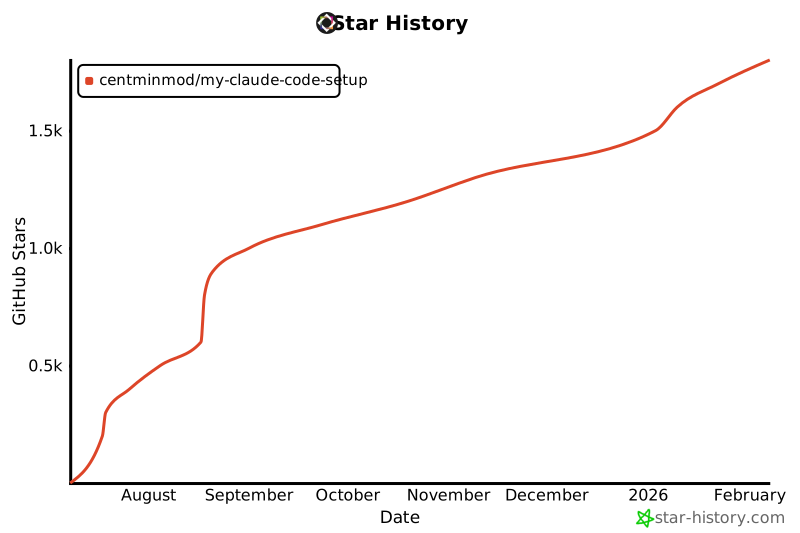
## Star History
|
||
|
||
[](https://www.star-history.com/#centminmod/my-claude-code-setup&Date)
|
||
|
||
|
||
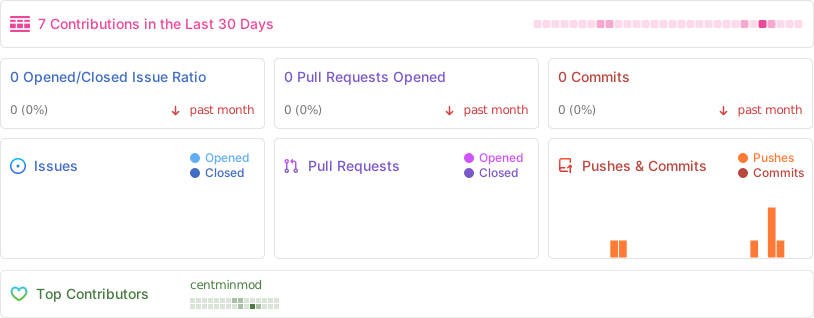
## Stats
|
||
|
||
 |