 ede8d22dd5
## Overview **Category:** improvement **User Impact:** Mobile users can now access consistent channel and DM actions from both the channel list and conversation header. **Problem:** Mobile channel menus exposed a narrower, inconsistent set of actions than desktop, and the available actions differed by entry point. **Solution:** This change introduces one reusable action sheet with a clear quick-action hierarchy, role-aware lifecycle controls, confirmations for consequential actions, and a deliberately narrower DM menu. ## Changes <details> <summary>File changes</summary> **mobile/lib/features/channels/channel_actions_sheet.dart** Adds the shared channel and DM action-sheet experience used by both entry points, including Star/Unstar and Read/Unread quick actions for channels, section movement, mute, management, inline copy actions, guarded lifecycle actions, confirmations, and a compact DM menu without quick actions. **mobile/lib/features/channels/channel_detail_page.dart** Routes the header ellipsis through the shared action sheet so the in-channel menu matches the channel-list experience, including for DMs. **mobile/lib/features/channels/channel_management_provider.dart** Adds archive and delete operations using the desktop-compatible relay event kinds and refreshes channel state after completion. **mobile/lib/features/channels/channels_page.dart** Makes the shared channel action-sheet entry point available to the channel-list implementation. **mobile/lib/features/channels/channels_page/channel_tile.dart** Replaces the tile-specific long-press menu with the reusable action sheet while preserving read state and section context. **mobile/test/features/channels/channel_actions_sheet_test.dart** Covers action hierarchy, owner/admin/member capability guards, loading and failure states, DM narrowing with no quick-action row, and inline copy actions. **mobile/test/features/channels/channel_detail_page_test.dart** Updates channel-header flows to exercise management through the new shared action sheet. **mobile/test/features/channels/channel_management_provider_test.dart** Verifies archive and delete event tags stay compatible with desktop behavior. </details> ## Reproduction Steps 1. Run the mobile app and open a populated channel list. 2. Long-press a regular channel and verify the Star/Unstar and Read/Unread quick actions appear above Move to section…, Mute, Manage, Copy channel name, and Copy channel ID. 3. Choose either copy action and verify it copies the expected value. 4. Open a channel, tap the header ellipsis, and verify the same action sheet appears. 5. As an admin or owner, verify Archive appears; as an owner, verify Delete also appears. Confirm that lifecycle actions require confirmation. 6. Long-press or open the header menu for a DM and verify it has no quick-action row and starts with Mute, followed by Copy channel name and Copy channel ID. ## Screenshots ### Channel menu | Regular channel — Mark Unread | DM — no quick actions | Archive confirmation | |---|---|---| | 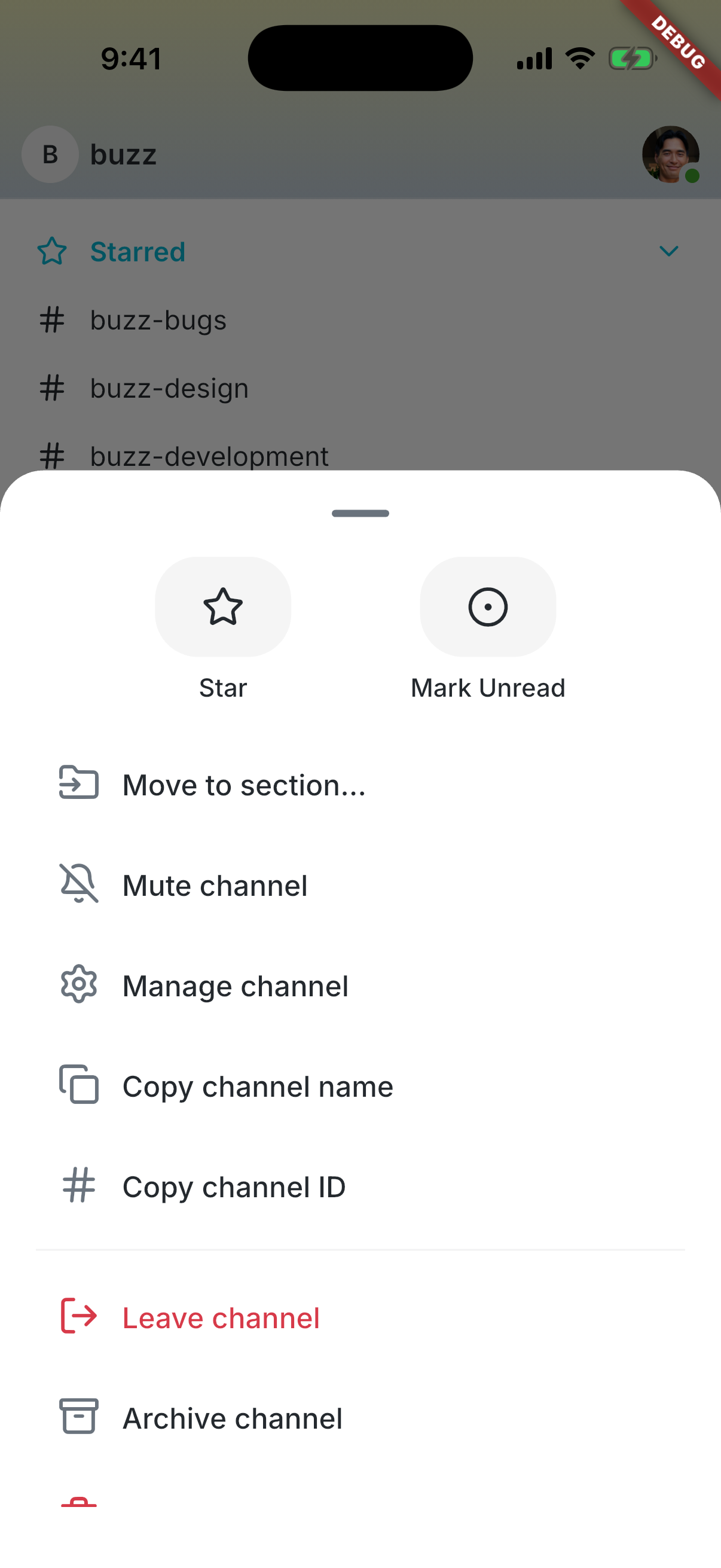 | 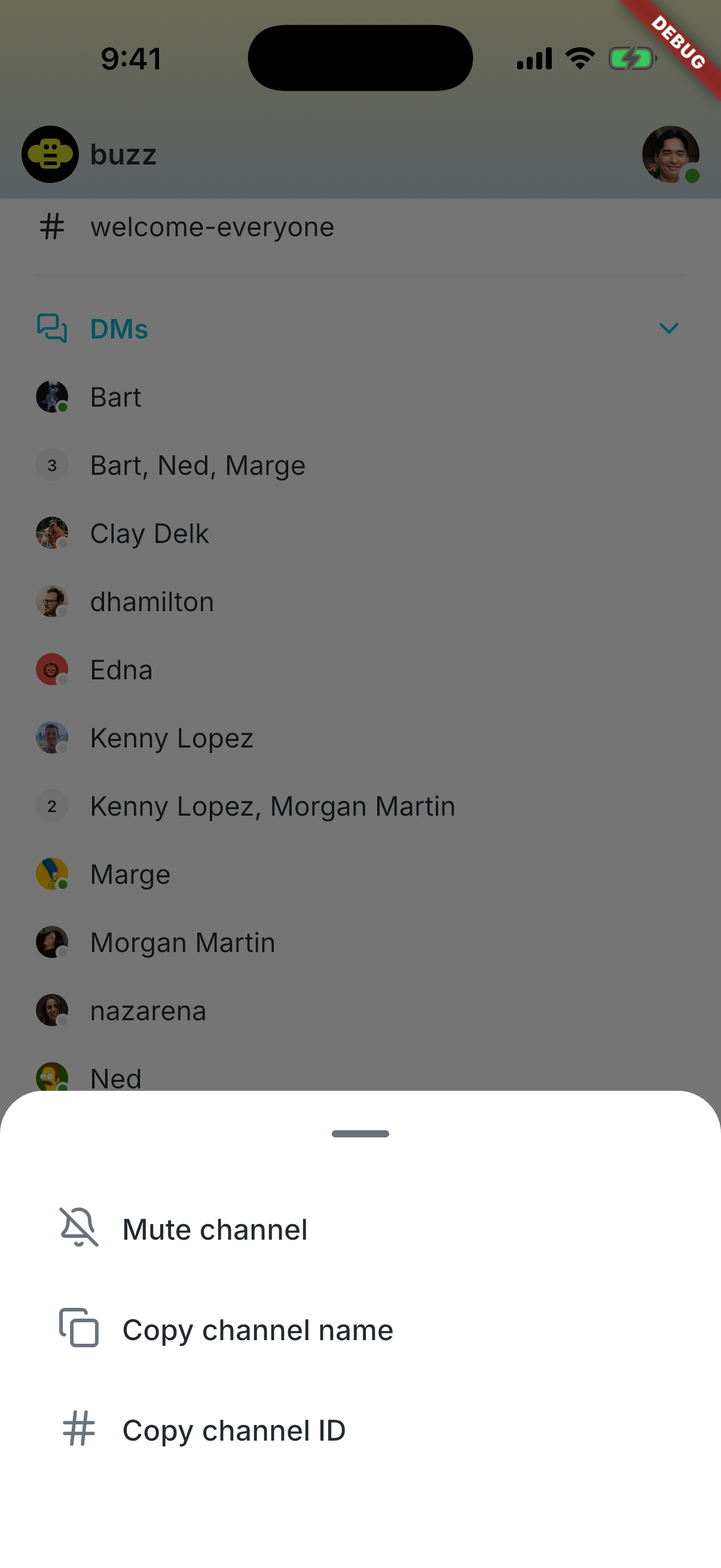 | 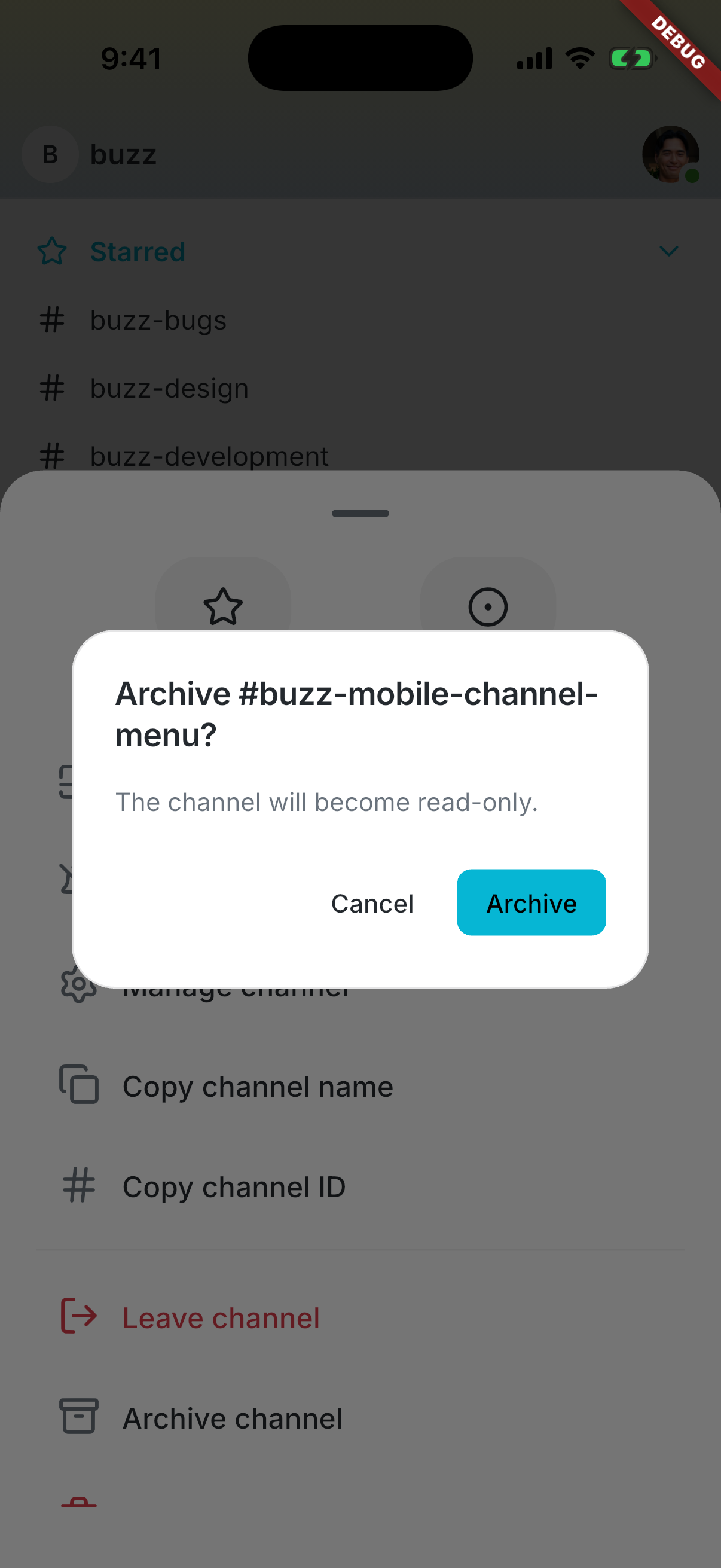 | --------- Signed-off-by: Taylor Ho <taylorkmho@gmail.com> Co-authored-by: npub1223z34hd7vtwc6qj4s7flsxkj644nlre2nthu7lrrmkumhu3xddsrx9r6w <52a228d6edf316ec6812ac3c9fc0d696ab59fc7954d77e7be31eedcddf91335b@buzz.block.builderlab.xyz>



Buzz Mobile
Flutter mobile client for Buzz.
Setup
cd mobile
flutter pub get
Run
# From repo root (recommended — starts Docker, relay, and simulator):
just mobile-dev

# Direct (requires services and relay already running):
cd mobile && flutter run
Worktree-aware debug identity
Debug builds produced from a git worktree get a unique app identifier keyed
to the worktree directory name (com.buzz.buzzMobile.<slug> on iOS,
xyz.block.buzz.mobile.<slug> on Android) plus a display-only branch label
in the app name (Buzz (my-branch), or a short SHA when the worktree is
detached). Because the identifier follows the directory rather than the
branch, one worktree keeps exactly one installed app — and its login state —
across branch switches, and builds from multiple worktrees install side by
side, mirroring the desktop dev experience. Release and profile builds
always keep the production identity and name.
just mobile-dev and just mobile-build-android apply this automatically by
running scripts/mobile-worktree-overrides.sh, which writes two gitignored
files:
mobile/ios/Flutter/WorktreeOverrides.xcconfig(included by Debug builds only; a developer'sAppOverrides.xcconfigis included after it, so app-specific overrides like a personalBUNDLE_IDENTIFIERfor device signing always win)mobile/android/worktree.properties(read by the debug build type only)
For direct Xcode / Android Studio / flutter run development, run
./scripts/mobile-worktree-overrides.sh from the repo root once per branch
switch to refresh the display label (the install identity never changes);
the persisted files are then picked up by any subsequent build. In the main
checkout the script is a no-op that removes stale override files, restoring
the plain Buzz identity.
To remove leftover worktree-suffixed installs from booted iOS simulators and
connected Android emulators, run just mobile-clean (add --dry-run via
./scripts/mobile-worktree-clean.sh --dry-run to preview). Production
installs are never touched.
Checks
dart format --output=none --set-exit-if-changed .
flutter analyze
flutter test
Or from the repo root: just mobile-check and just mobile-test.
Android release signing
Android release builds fail unless all upload-key inputs are supplied through the environment:
BUZZ_ANDROID_UPLOAD_KEYSTORE_PATH: path to a CI-vended keystore fileBUZZ_ANDROID_UPLOAD_KEYSTORE_PASSWORDBUZZ_ANDROID_UPLOAD_KEY_ALIASBUZZ_ANDROID_UPLOAD_KEY_PASSWORD
The keystore path must be absolute, and the keystore must remain outside the repository. Development and debug builds do not require these variables.
Release pipelines that sign through the central APK Signer service instead of
a local upload keystore must set BUZZ_ANDROID_RELEASE_SIGNING=external. That
mode produces an unsigned release bundle and refuses to run if any
BUZZ_ANDROID_UPLOAD_* value is also set.
Architecture
lib/
├── main.dart              # Entry point, Riverpod bootstrap
├── app.dart               # MaterialApp with theme
├── shared/
│   └── theme/             # Catppuccin light/dark, spacing tokens, extensions
└── features/
    └── home/              # Placeholder home surface
- State management: Riverpod + Hooks (
HookConsumerWidget) - Theme: Catppuccin Latte (light) / Macchiato (dark) — matches desktop
- Spacing:
Gridtokens for consistent spacing - Linting:
flutter_lints+riverpod_lintviacustom_lint - Feature isolation: No cross-feature imports except
shared/