mirror of
https://github.com/block/buzz.git
synced 2026-08-18 06:50:31 +02:00
 Taylor HoandGitHub
edc4a09aaa
Taylor HoandGitHub
edc4a09aaa
**Category:** improvement **User Impact:** Users can scan what each workflow does and trigger, edit, duplicate, enable, disable, or delete it directly from the library. **Problem:** The workflow list buried common actions and did not expose each automation's trigger-to-action shape at a glance. **Solution:** Add a responsive workflow library with a persistent create tile, compact trigger/action diagrams, prominent workflow titles with supporting descriptions, and shared card actions while preserving existing detail, editor, and run-history entry points. Card toggles refresh both list and open-detail caches so status and definition stay consistent. <details> <summary>File changes</summary> **desktop/src/features/workflows/ui/WorkflowActionsMenu.tsx** Adds a shared card menu for trigger, edit, duplicate, enable/disable, and delete actions. **desktop/src/features/workflows/ui/WorkflowCard.tsx** Reworks cards around the prototype's visual hierarchy: color-coded trigger, action flow, sentence-case eyebrow, prominent title, supporting description, status, channel, and update date without a footer clock icon. **desktop/src/features/workflows/ui/WorkflowsView.tsx** Adds the responsive grid, create tile, mutation wiring, and list/detail cache invalidation. Container breakpoints keep cards two-across at medium widths and three-across in the 1280px desktop layout. **desktop/src/features/workflows/ui/workflowDefinition.ts** Adds immutable enabled-state updates plus narrow trigger and first-action readers used only to select card icons. **desktop/src/features/workflows/ui/workflowDefinition.test.mjs** Covers neutral icon selection, enabled-state immutability, and status presentation. **desktop/tests/e2e/workflows.spec.ts** Covers the create tile, title/description hierarchy, selected-card enable/disable consistency, and deterministic narrow/medium/wide captures while retaining existing action coverage. </details> ## Reproduction steps 1. Open **Workflows** and confirm the create tile stays first as cards flow from one to three columns with available width. 2. Confirm each card shows a sentence-case trigger eyebrow, prominent workflow title, supporting description when present, status, channel, and update date without a clock icon. 3. Open a card's overflow menu and trigger, edit, duplicate, enable/disable, or delete the workflow. 4. Leave the detail panel open while toggling and confirm its badge and JSON definition update with the card. ## Screenshots Real built E2E UI with representative workflow data at three viewport sizes. ### Narrow — 800 × 720 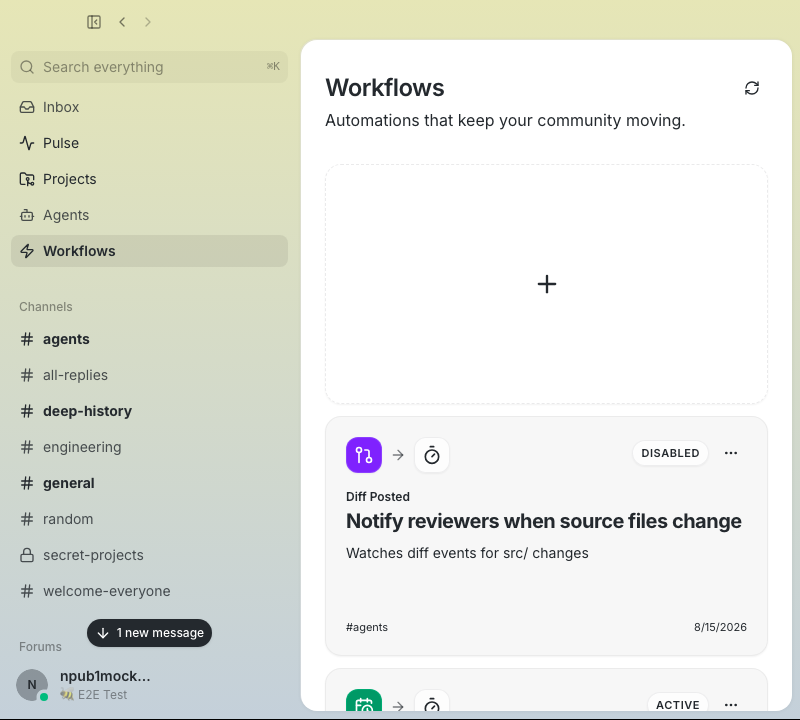 ### Medium — 1024 × 720 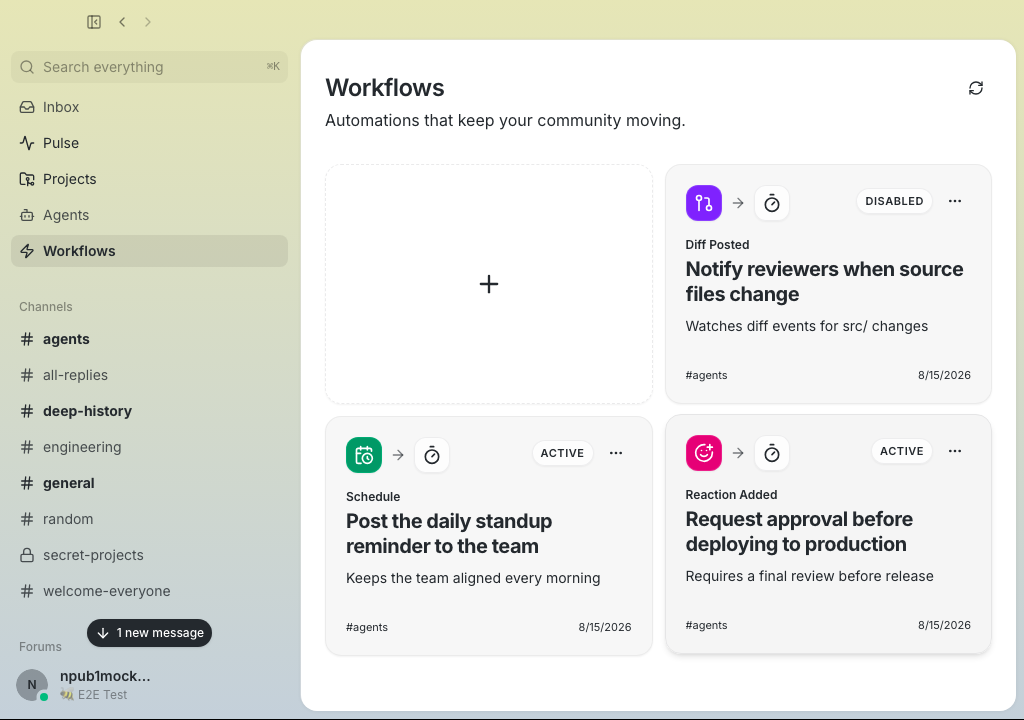 ### Wide — 1280 × 720 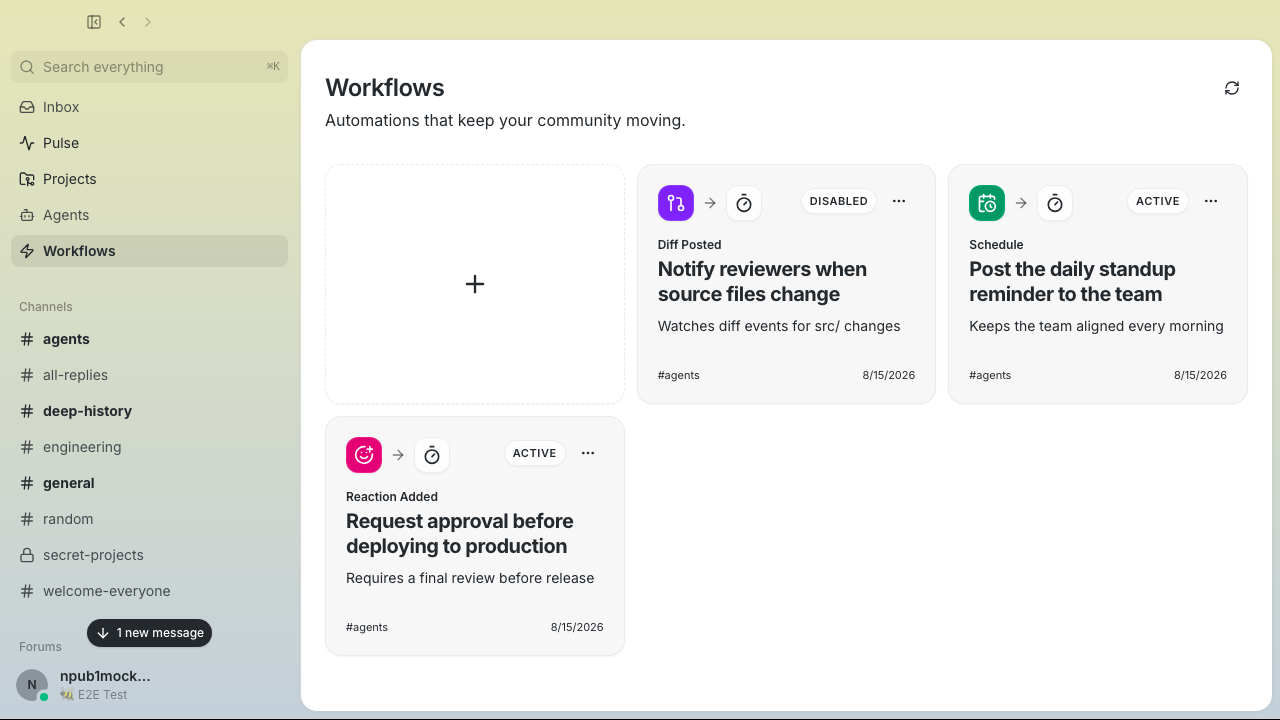 ### Card actions 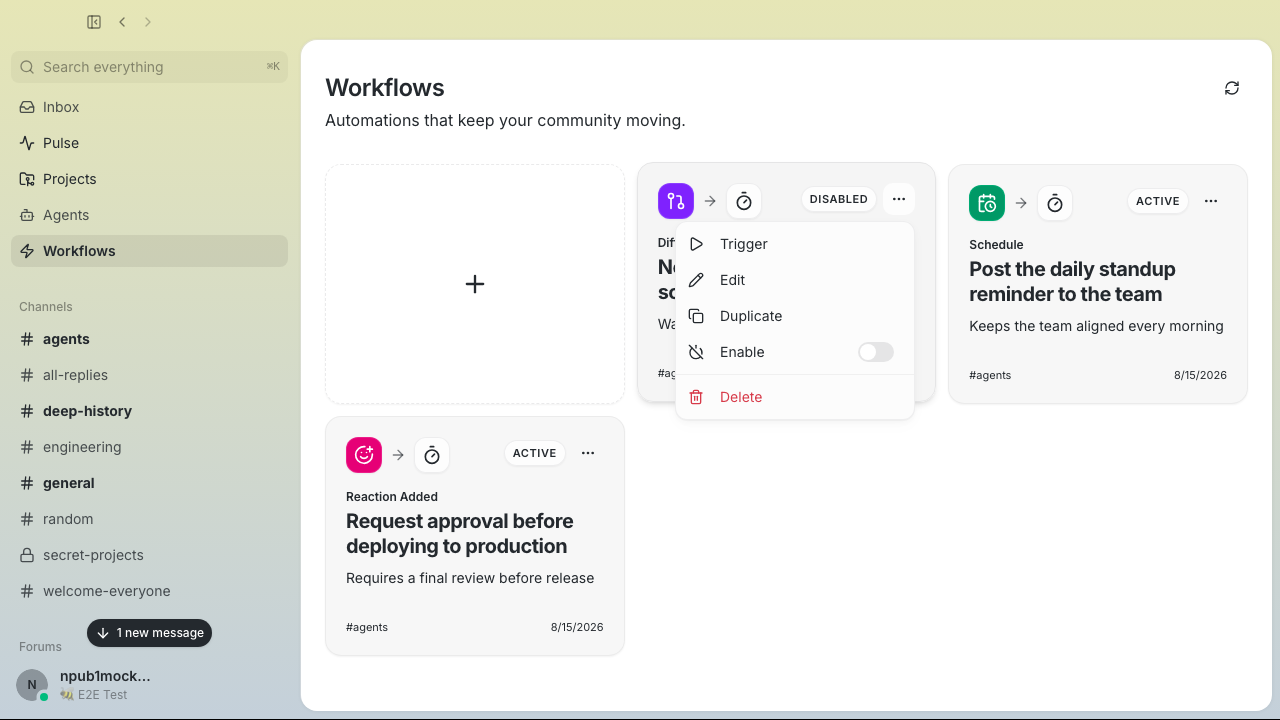 --------- Signed-off-by: Taylor Ho <taylorkmho@gmail.com>




327 lines
10 KiB
TypeScript
327 lines
10 KiB
TypeScript
import { Plus, RefreshCw } from "lucide-react";
|
||
import * as React from "react";
|
||
import { useMutation, useQuery, useQueryClient } from "@tanstack/react-query";
|
||
import { toast } from "sonner";
|
||
import { stringify as yamlStringify } from "yaml";
|
||
|
||
import {
|
||
allWorkflowsQueryKey,
|
||
workflowListFocusRefetchPolicy,
|
||
workflowQueryKey,
|
||
} from "@/features/workflows/hooks";
|
||
import { WorkflowCard } from "@/features/workflows/ui/WorkflowCard";
|
||
import { WorkflowDeleteDialog } from "@/features/workflows/ui/WorkflowDeleteDialog";
|
||
import { WorkflowDetailPanel } from "@/features/workflows/ui/WorkflowDetailPanel";
|
||
import { WorkflowDialog } from "@/features/workflows/ui/WorkflowDialog";
|
||
import type { Channel, Workflow } from "@/shared/api/types";
|
||
import {
|
||
deleteWorkflow,
|
||
getChannelsWorkflows,
|
||
triggerWorkflow,
|
||
updateWorkflow,
|
||
} from "@/shared/api/tauriWorkflows";
|
||
import { Button } from "@/shared/ui/button";
|
||
import { PageHeader } from "@/shared/ui/PageHeader";
|
||
import { Skeleton } from "@/shared/ui/skeleton";
|
||
import { getWorkflowEnabled, withWorkflowEnabled } from "./workflowDefinition";
|
||
|
||
type WorkflowsViewProps = {
|
||
channels: Channel[];
|
||
onCloseWorkflow: () => void;
|
||
onSelectWorkflow: (workflowId: string) => void;
|
||
selectedWorkflowId: string | null;
|
||
};
|
||
|
||
type WorkflowWithChannel = {
|
||
workflow: Workflow;
|
||
channelName: string;
|
||
};
|
||
|
||
type DialogState =
|
||
| { mode: "closed" }
|
||
| { mode: "create" }
|
||
| { mode: "edit"; workflow: Workflow }
|
||
| { mode: "duplicate"; workflow: Workflow };
|
||
|
||
const WORKFLOW_CARD_GRID_CLASS =
|
||
"grid grid-cols-1 gap-3 [@container(min-width:38rem)]:grid-cols-2 [@container(min-width:54rem)]:grid-cols-3";
|
||
|
||
function WorkflowsListSkeleton() {
|
||
return (
|
||
<div className={WORKFLOW_CARD_GRID_CLASS}>
|
||
{["first", "second", "third", "fourth"].map((card) => (
|
||
<div
|
||
className="flex min-h-60 flex-col rounded-2xl border bg-card p-5"
|
||
key={card}
|
||
>
|
||
<div className="flex items-start justify-between">
|
||
<Skeleton className="h-9 w-9 rounded-xl" />
|
||
<Skeleton className="h-6 w-16 rounded-full" />
|
||
</div>
|
||
<Skeleton className="mt-5 h-6 w-3/4" />
|
||
<Skeleton className="mt-3 h-4 w-full" />
|
||
<Skeleton className="mt-2 h-4 w-4/5" />
|
||
<Skeleton className="mt-auto h-4 w-32" />
|
||
</div>
|
||
))}
|
||
</div>
|
||
);
|
||
}
|
||
|
||
function CreateWorkflowCard({ onClick }: { onClick: () => void }) {
|
||
return (
|
||
<button
|
||
aria-label="Create Workflow"
|
||
className="group relative flex min-h-60 w-full min-w-0 items-center justify-center overflow-hidden rounded-2xl border border-dashed border-border/80 bg-transparent text-muted-foreground shadow-xs transition-colors hover:border-border hover:bg-muted/70 hover:text-foreground focus-visible:outline-hidden focus-visible:ring-2 focus-visible:ring-ring"
|
||
data-testid="new-workflow-card"
|
||
onClick={onClick}
|
||
type="button"
|
||
>
|
||
<Plus className="h-7 w-7 transition-colors" />
|
||
</button>
|
||
);
|
||
}
|
||
|
||
export function WorkflowsView({
|
||
channels,
|
||
onCloseWorkflow,
|
||
onSelectWorkflow,
|
||
selectedWorkflowId,
|
||
}: WorkflowsViewProps) {
|
||
const [dialogState, setDialogState] = React.useState<DialogState>({
|
||
mode: "closed",
|
||
});
|
||
const [deleteTarget, setDeleteTarget] = React.useState<Workflow | null>(null);
|
||
const queryClient = useQueryClient();
|
||
|
||
const memberChannels = channels.filter((c) => c.isMember);
|
||
const channelIds = memberChannels.map((c) => c.id).sort();
|
||
const channelIdKey = channelIds.join(",");
|
||
|
||
const allWorkflowsQuery = useQuery({
|
||
queryKey: allWorkflowsQueryKey(channelIdKey),
|
||
queryFn: async () => {
|
||
// Single batched relay query for all member channels, then group by the
|
||
// channel_id each workflow carries — replaces the per-channel fanout.
|
||
const channelNameById = new Map(
|
||
memberChannels.map((channel) => [channel.id, channel.name]),
|
||
);
|
||
const workflows = await getChannelsWorkflows(channelIds);
|
||
const results: WorkflowWithChannel[] = [];
|
||
for (const workflow of workflows) {
|
||
results.push({
|
||
workflow,
|
||
channelName: workflow.channelId
|
||
? (channelNameById.get(workflow.channelId) ?? "")
|
||
: "",
|
||
});
|
||
}
|
||
return results;
|
||
},
|
||
enabled: memberChannels.length > 0,
|
||
...workflowListFocusRefetchPolicy,
|
||
});
|
||
|
||
const allWorkflows = allWorkflowsQuery.data ?? [];
|
||
|
||
const triggerMutation = useMutation({
|
||
mutationFn: (workflowId: string) => triggerWorkflow(workflowId),
|
||
onSuccess: () => {
|
||
void queryClient.invalidateQueries({
|
||
predicate: (query) => query.queryKey[0] === "workflow-runs",
|
||
});
|
||
},
|
||
});
|
||
|
||
const deleteMutation = useMutation({
|
||
mutationFn: (workflowId: string) => deleteWorkflow(workflowId),
|
||
onSuccess: (_data, workflowId) => {
|
||
if (selectedWorkflowId === workflowId) {
|
||
onCloseWorkflow();
|
||
}
|
||
void queryClient.invalidateQueries({
|
||
predicate: (query) =>
|
||
query.queryKey[0] === "workflows" ||
|
||
query.queryKey[0] === "workflows-all",
|
||
});
|
||
},
|
||
});
|
||
|
||
const toggleEnabledMutation = useMutation({
|
||
mutationFn: (workflow: Workflow) =>
|
||
updateWorkflow(
|
||
workflow.id,
|
||
yamlStringify(
|
||
withWorkflowEnabled(
|
||
workflow.definition,
|
||
!getWorkflowEnabled(workflow.definition),
|
||
),
|
||
),
|
||
workflow.revision,
|
||
),
|
||
onError: (error) => {
|
||
toast.error("Couldn’t change workflow status", {
|
||
description:
|
||
error instanceof Error
|
||
? error.message
|
||
: "The workflow was not changed. Try again.",
|
||
});
|
||
},
|
||
onSuccess: (_data, workflow) => {
|
||
void queryClient.invalidateQueries({
|
||
queryKey: workflowQueryKey(workflow.id),
|
||
});
|
||
void queryClient.invalidateQueries({
|
||
predicate: (query) =>
|
||
query.queryKey[0] === "workflows" ||
|
||
query.queryKey[0] === "workflows-all",
|
||
});
|
||
},
|
||
});
|
||
|
||
const triggerOne = triggerMutation.mutate;
|
||
const handleTrigger = React.useCallback(
|
||
(workflowId: string) => triggerOne(workflowId),
|
||
[triggerOne],
|
||
);
|
||
|
||
const handleDelete = React.useCallback(
|
||
(workflow: Workflow) => setDeleteTarget(workflow),
|
||
[],
|
||
);
|
||
|
||
const deleteOne = deleteMutation.mutate;
|
||
const handleConfirmDelete = React.useCallback(
|
||
(workflow: Workflow) => {
|
||
deleteOne(workflow.id);
|
||
setDeleteTarget(null);
|
||
},
|
||
[deleteOne],
|
||
);
|
||
|
||
const handleEdit = React.useCallback(
|
||
(workflow: Workflow) => setDialogState({ mode: "edit", workflow }),
|
||
[],
|
||
);
|
||
|
||
const handleDuplicate = React.useCallback(
|
||
(workflow: Workflow) => setDialogState({ mode: "duplicate", workflow }),
|
||
[],
|
||
);
|
||
|
||
const toggleEnabled = toggleEnabledMutation.mutate;
|
||
const handleToggleEnabled = React.useCallback(
|
||
(workflow: Workflow) => toggleEnabled(workflow),
|
||
[toggleEnabled],
|
||
);
|
||
|
||
const handleDialogOpenChange = React.useCallback((open: boolean) => {
|
||
if (!open) {
|
||
setDialogState({ mode: "closed" });
|
||
}
|
||
}, []);
|
||
|
||
return (
|
||
<div
|
||
className="relative flex min-h-0 flex-1 overflow-hidden"
|
||
data-testid="workflows-view"
|
||
>
|
||
<div
|
||
className="flex min-h-0 flex-1 flex-col overflow-y-auto overflow-x-hidden overscroll-contain px-4 py-7 sm:px-6 sm:py-8"
|
||
data-scroll-restoration-id="workflows-list"
|
||
>
|
||
<div className="mx-auto w-full max-w-6xl space-y-8 [container-type:inline-size]">
|
||
<PageHeader
|
||
action={
|
||
<Button
|
||
aria-label="Refresh workflows"
|
||
disabled={allWorkflowsQuery.isFetching}
|
||
onClick={() => void allWorkflowsQuery.refetch()}
|
||
size="icon"
|
||
variant="ghost"
|
||
>
|
||
<RefreshCw
|
||
className={`h-4 w-4 ${allWorkflowsQuery.isFetching ? "animate-spin" : ""}`}
|
||
/>
|
||
</Button>
|
||
}
|
||
description="Automations that keep your community moving."
|
||
title="Workflows"
|
||
/>
|
||
|
||
{allWorkflowsQuery.isLoading ? (
|
||
<WorkflowsListSkeleton />
|
||
) : allWorkflowsQuery.isError ? (
|
||
<div className="flex flex-col items-center justify-center gap-2 py-16 text-muted-foreground">
|
||
<p className="text-sm text-red-400">Failed to load workflows</p>
|
||
<Button
|
||
onClick={() => void allWorkflowsQuery.refetch()}
|
||
size="sm"
|
||
variant="outline"
|
||
>
|
||
Retry
|
||
</Button>
|
||
</div>
|
||
) : (
|
||
<div className={WORKFLOW_CARD_GRID_CLASS}>
|
||
<CreateWorkflowCard
|
||
onClick={() => setDialogState({ mode: "create" })}
|
||
/>
|
||
{allWorkflows.map(({ workflow, channelName }) => (
|
||
<WorkflowCard
|
||
channelName={channelName}
|
||
isActive={selectedWorkflowId === workflow.id}
|
||
isTogglingEnabled={
|
||
toggleEnabledMutation.isPending &&
|
||
toggleEnabledMutation.variables?.id === workflow.id
|
||
}
|
||
key={workflow.id}
|
||
onDelete={handleDelete}
|
||
onDuplicate={handleDuplicate}
|
||
onEdit={handleEdit}
|
||
onSelect={onSelectWorkflow}
|
||
onToggleEnabled={handleToggleEnabled}
|
||
onTrigger={handleTrigger}
|
||
workflow={workflow}
|
||
/>
|
||
))}
|
||
</div>
|
||
)}
|
||
</div>
|
||
</div>
|
||
|
||
{selectedWorkflowId ? (
|
||
<div className="w-[400px] shrink-0">
|
||
<WorkflowDetailPanel
|
||
key={selectedWorkflowId}
|
||
onClose={onCloseWorkflow}
|
||
onEdit={handleEdit}
|
||
workflowId={selectedWorkflowId}
|
||
/>
|
||
</div>
|
||
) : null}
|
||
|
||
<WorkflowDialog
|
||
channels={memberChannels}
|
||
mode={dialogState.mode === "closed" ? "create" : dialogState.mode}
|
||
onOpenChange={handleDialogOpenChange}
|
||
open={dialogState.mode !== "closed"}
|
||
workflow={
|
||
dialogState.mode === "edit" || dialogState.mode === "duplicate"
|
||
? dialogState.workflow
|
||
: null
|
||
}
|
||
/>
|
||
|
||
<WorkflowDeleteDialog
|
||
onConfirm={handleConfirmDelete}
|
||
onOpenChange={(open) => {
|
||
if (!open) setDeleteTarget(null);
|
||
}}
|
||
open={deleteTarget !== null}
|
||
workflow={deleteTarget}
|
||
/>
|
||
</div>
|
||
);
|
||
}
|