A modern, customizable web honeypot server designed to detect and track malicious activity from attackers and web crawlers through deceptive web pages, fake credentials, and canary tokens.
## Table of Contents
- [Demo](#demo)
- [What is Krawl?](#what-is-krawl)
- [Krawl Dashboard](#krawl-dashboard)
- [Installation](#-installation)
- [Docker Run](#docker-run)
- [Docker Compose](#docker-compose)
- [Kubernetes](#kubernetes)
- [Configuration](#configuration)
- [config.yaml](#configuration-via-configyaml)
- [Environment Variables](#configuration-via-enviromental-variables)
- [Ban Malicious IPs](#use-krawl-to-ban-malicious-ips)
- [IP Reputation](#ip-reputation)
- [Forward Server Header](#forward-server-header)
- [Additional Documentation](#additional-documentation)
- [Contributing](#-contributing)
## Demo
Tip: crawl the `robots.txt` paths for additional fun
### Krawl URL: [http://demo.krawlme.com](http://demo.krawlme.com)
### View the dashboard [http://demo.krawlme.com/das_dashboard](http://demo.krawlme.com/das_dashboard)
## What is Krawl?
**Krawl** is a cloud‑native deception server designed to detect, delay, and analyze malicious attackers, web crawlers and automated scanners.
It creates realistic fake web applications filled with low‑hanging fruit such as admin panels, configuration files, and exposed fake credentials to attract and identify suspicious activity.
By wasting attacker resources, Krawl helps clearly distinguish malicious behavior from legitimate crawlers.
It features:
- **Spider Trap Pages**: Infinite random links to waste crawler resources based on the [spidertrap project](https://github.com/adhdproject/spidertrap)
- **Fake Login Pages**: WordPress, phpMyAdmin, admin panels
- **Honeypot Paths**: Advertised in robots.txt to catch scanners
- **Fake Credentials**: Realistic-looking usernames, passwords, API keys
- **[Canary Token](docs/canary-token.md) Integration**: External alert triggering
- **Random server headers**: Confuse attacks based on server header and version
- **Real-time Dashboard**: Monitor suspicious activity
- **Customizable Wordlists**: Easy JSON-based configuration
- **Random Error Injection**: Mimic real server behavior
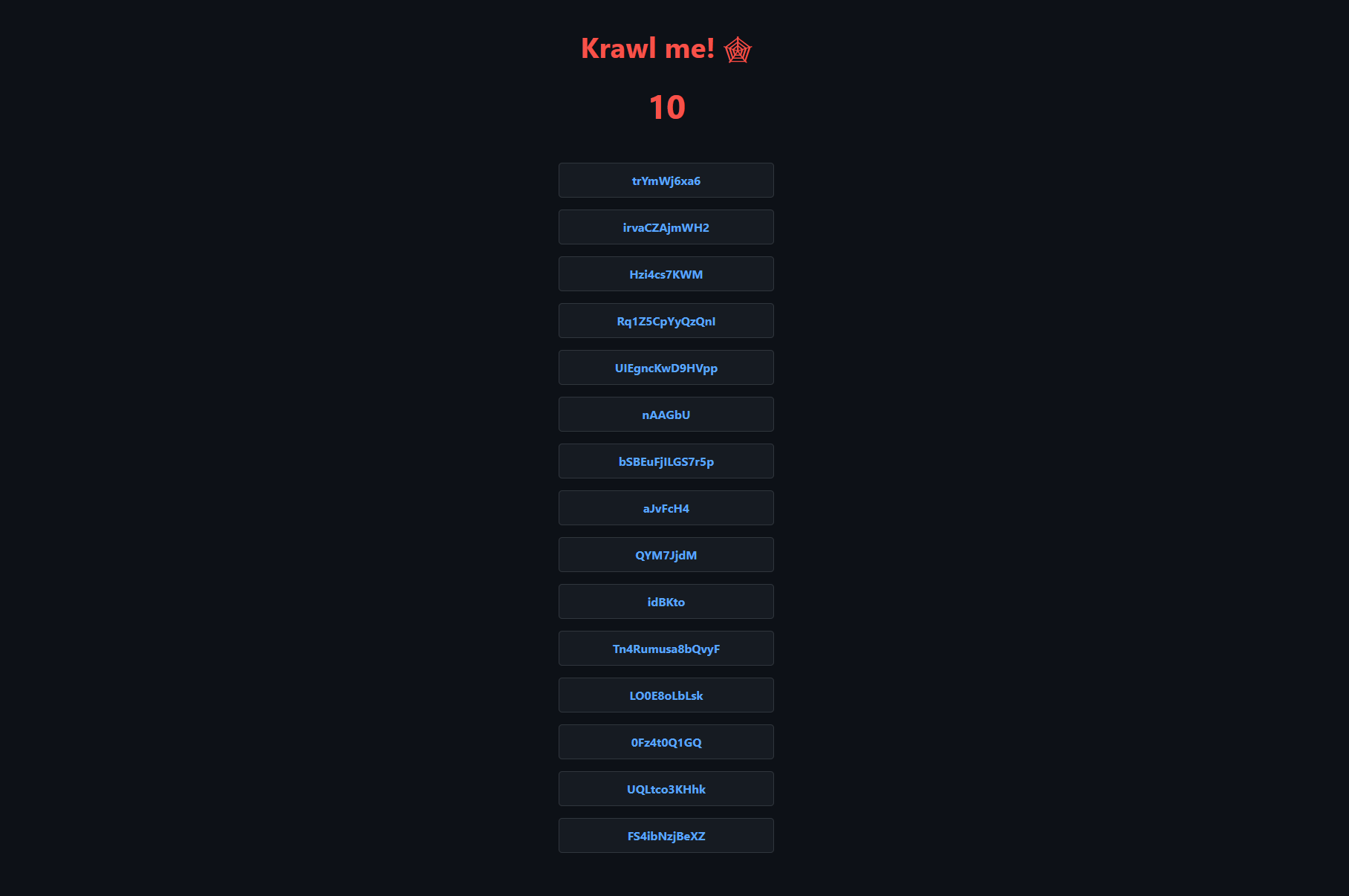
## Krawl Dashboard
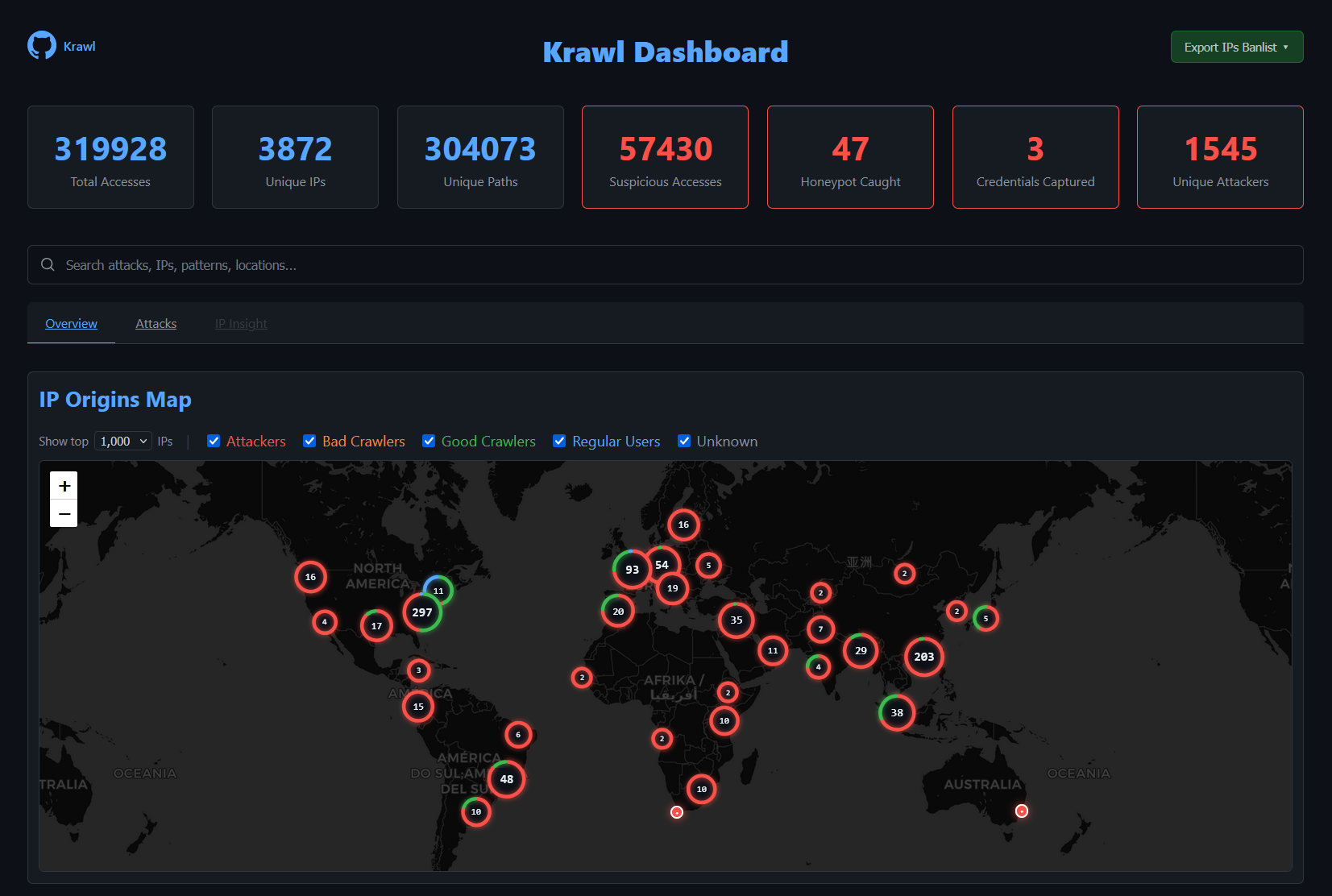
Krawl provides a comprehensive dashboard, accessible at a **random secret path** generated at startup or at a **custom path** configured via `KRAWL_DASHBOARD_SECRET_PATH`. This keeps the dashboard hidden from attackers scanning your honeypot.
The dashboard is organized in three main tabs:
- **Overview** — High-level view of attack activity: an interactive map of IP origins, recent suspicious requests, and top IPs, User-Agents, and paths.
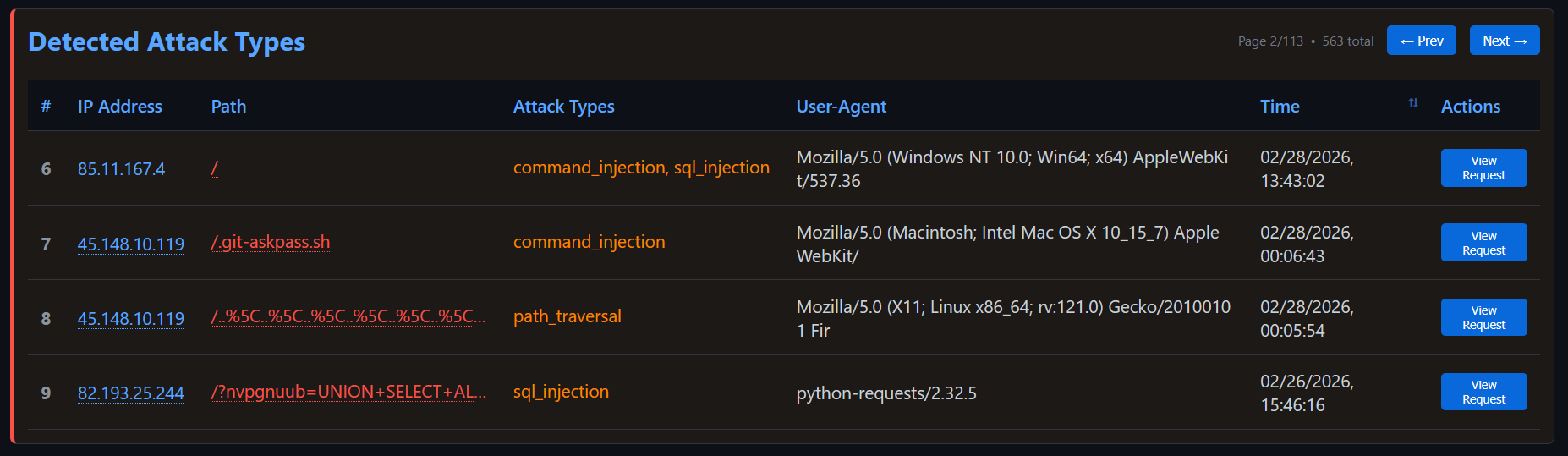
- **Attacks** — Detailed breakdown of captured credentials, honeypot triggers, and detected attack types (SQLi, XSS, path traversal, etc.) with charts and tables.
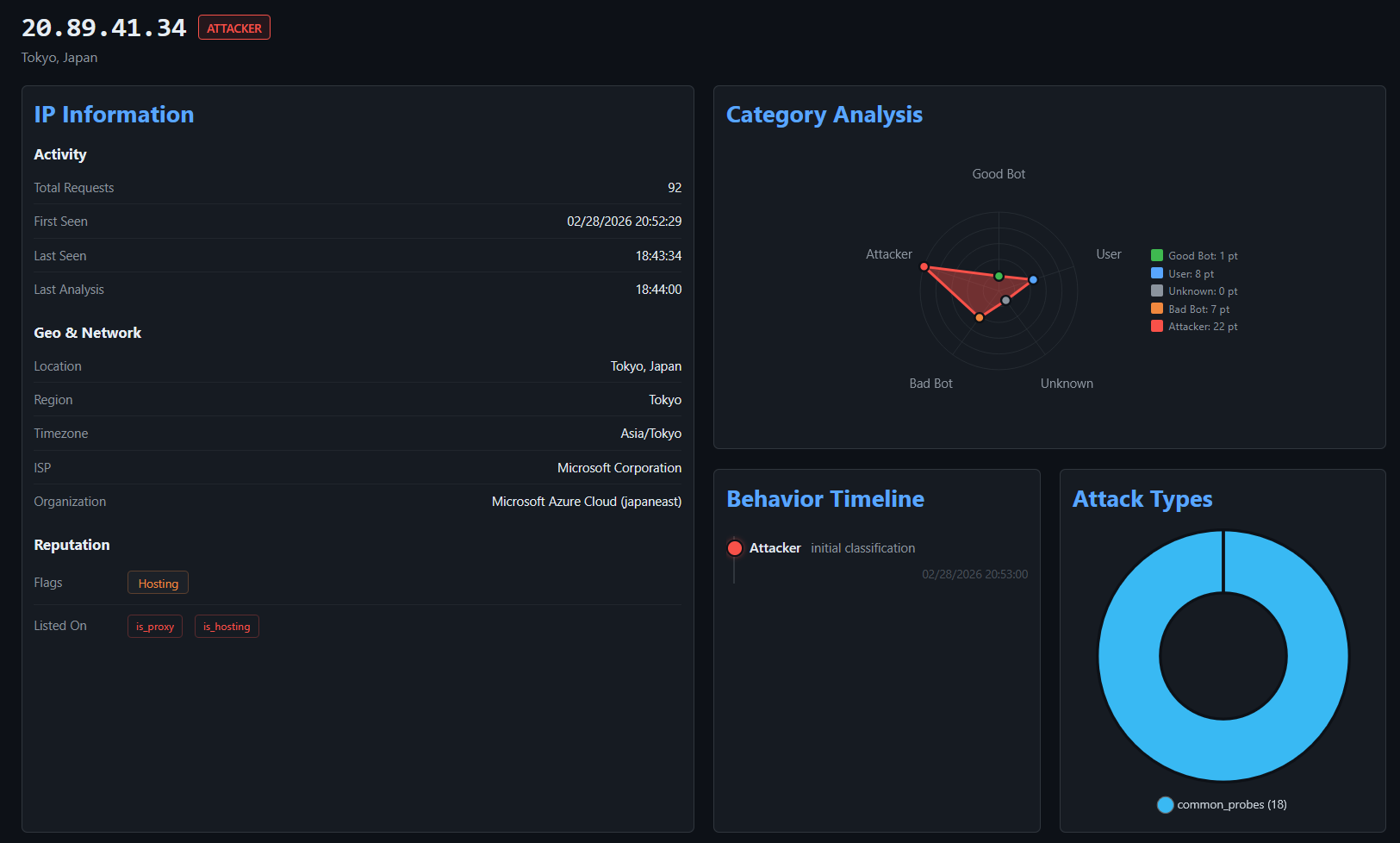
- **IP Insight** — In-depth forensic view of a selected IP: geolocation, ISP/ASN info, reputation flags, behavioral timeline, attack type distribution, and full access history.
For more details, see the [Dashboard documentation](docs/dashboard.md).
## 🚀 Installation
### Docker Run
Run Krawl with the latest image:
```bash
docker run -d \
-p 5000:5000 \
-e KRAWL_PORT=5000 \
-e KRAWL_DELAY=100 \
-e KRAWL_DASHBOARD_SECRET_PATH="/my-secret-dashboard" \
-v krawl-data:/app/data \
--name krawl \
ghcr.io/blessedrebus/krawl:latest
```
Access the server at `http://localhost:5000`
### Docker Compose
Create a `docker-compose.yaml` file:
```yaml
services:
krawl:
image: ghcr.io/blessedrebus/krawl:latest
container_name: krawl-server
ports:
- "5000:5000"
environment:
- CONFIG_LOCATION=config.yaml
- TZ=Europe/Rome
volumes:
- ./config.yaml:/app/config.yaml:ro
# bind mount for firewall exporters
- ./exports:/app/exports
- krawl-data:/app/data
restart: unless-stopped
volumes:
krawl-data:
```
Run with:
```bash
docker-compose up -d
```
Stop with:
```bash
docker-compose down
```
### Kubernetes
**Krawl is also available natively on Kubernetes**. Installation can be done either [via manifest](kubernetes/README.md) or [using the helm chart](helm/README.md).
## Configuration
Krawl uses a **configuration hierarchy** in which **environment variables take precedence over the configuration file**. This approach is recommended for Docker deployments and quick out-of-the-box customization.
### Configuration via config.yaml
You can use the [config.yaml](config.yaml) file for advanced configurations, such as Docker Compose or Helm chart deployments.
### Configuration via Enviromental Variables
| Environment Variable | Description | Default |
|----------------------|-------------|---------|
| `CONFIG_LOCATION` | Path to yaml config file | `config.yaml` |
| `KRAWL_PORT` | Server listening port | `5000` |
| `KRAWL_DELAY` | Response delay in milliseconds | `100` |
| `KRAWL_SERVER_HEADER` | HTTP Server header for deception | `""` |
| `KRAWL_LINKS_LENGTH_RANGE` | Link length range as `min,max` | `5,15` |
| `KRAWL_LINKS_PER_PAGE_RANGE` | Links per page as `min,max` | `10,15` |
| `KRAWL_CHAR_SPACE` | Characters used for link generation | `abcdefgh...` |
| `KRAWL_MAX_COUNTER` | Initial counter value | `10` |
| `KRAWL_CANARY_TOKEN_URL` | External canary token URL | None |
| `KRAWL_CANARY_TOKEN_TRIES` | Requests before showing canary token | `10` |
| `KRAWL_DASHBOARD_SECRET_PATH` | Custom dashboard path | Auto-generated |
| `KRAWL_PROBABILITY_ERROR_CODES` | Error response probability (0-100%) | `0` |
| `KRAWL_DATABASE_PATH` | Database file location | `data/krawl.db` |
| `KRAWL_EXPORTS_PATH` | Path where firewalls rule sets are exported | `exports` |
| `KRAWL_BACKUPS_PATH` | Path where database dump are saved | `backups` |
| `KRAWL_BACKUPS_CRON` | cron expression to control backup job schedule | `*/30 * * * *` |
| `KRAWL_BACKUPS_ENABLED` | Boolean to enable db dump job | `true` |
| `KRAWL_DATABASE_RETENTION_DAYS` | Days to retain data in database | `30` |
| `KRAWL_HTTP_RISKY_METHODS_THRESHOLD` | Threshold for risky HTTP methods detection | `0.1` |
| `KRAWL_VIOLATED_ROBOTS_THRESHOLD` | Threshold for robots.txt violations | `0.1` |
| `KRAWL_UNEVEN_REQUEST_TIMING_THRESHOLD` | Coefficient of variation threshold for timing | `0.5` |
| `KRAWL_UNEVEN_REQUEST_TIMING_TIME_WINDOW_SECONDS` | Time window for request timing analysis in seconds | `300` |
| `KRAWL_USER_AGENTS_USED_THRESHOLD` | Threshold for detecting multiple user agents | `2` |
| `KRAWL_ATTACK_URLS_THRESHOLD` | Threshold for attack URL detection | `1` |
| `KRAWL_INFINITE_PAGES_FOR_MALICIOUS` | Serve infinite pages to malicious IPs | `true` |
| `KRAWL_MAX_PAGES_LIMIT` | Maximum page limit for crawlers | `250` |
| `KRAWL_BAN_DURATION_SECONDS` | Ban duration in seconds for rate-limited IPs | `600` |
For example
```bash
# Set canary token
export CONFIG_LOCATION="config.yaml"
export KRAWL_CANARY_TOKEN_URL="http://your-canary-token-url"
# Set number of pages range (min,max format)
export KRAWL_LINKS_PER_PAGE_RANGE="5,25"
# Set analyzer thresholds
export KRAWL_HTTP_RISKY_METHODS_THRESHOLD="0.2"
export KRAWL_VIOLATED_ROBOTS_THRESHOLD="0.15"
# Set custom dashboard path
export KRAWL_DASHBOARD_SECRET_PATH="/my-secret-dashboard"
```
Example of a Docker run with env variables:
```bash
docker run -d \
-p 5000:5000 \
-e KRAWL_PORT=5000 \
-e KRAWL_DELAY=100 \
-e KRAWL_CANARY_TOKEN_URL="http://your-canary-token-url" \
--name krawl \
ghcr.io/blessedrebus/krawl:latest
```
## Use Krawl to Ban Malicious IPs
Krawl uses a reputation-based system to classify attacker IP addresses. Every five minutes, Krawl exports the identified malicious IPs to a `malicious_ips.txt` file.
This file can either be mounted from the Docker container into another system or downloaded directly via `curl`:
```bash
curl https://your-krawl-instance/