
Send Email Reminders for Password Expiration
Learn how to send password expiry notifications via email in Microsoft 365 using a PowerShell script to ensure timely updates and prevent lockouts.
Sample Output
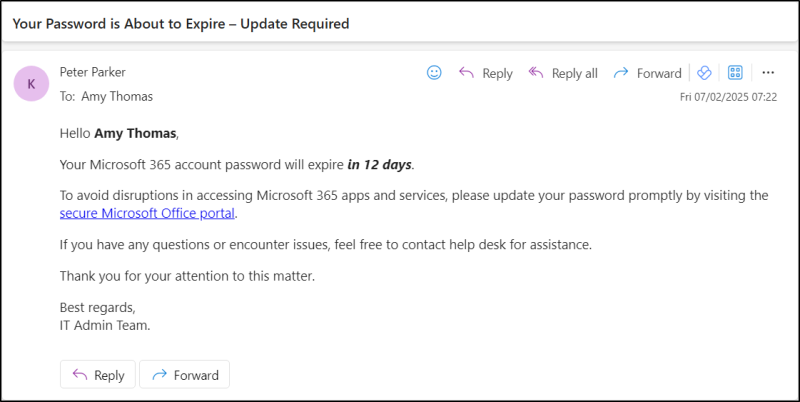
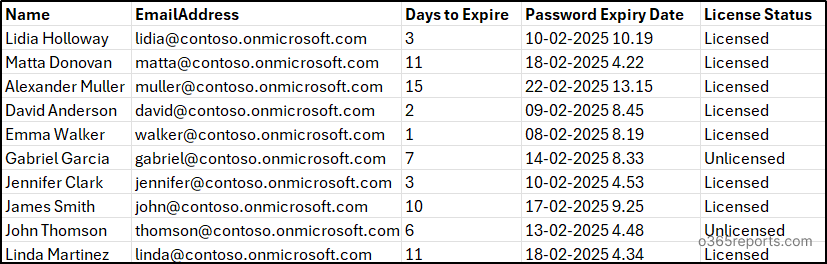
The script sends password expiration notifications to all users with password expiry in specific days and prompts them to change their password using Microsoft security info. It also generates a CSV file with the password expiration details of those users. The sample output is shown in the screenshots below.
Sample Password Expiry Notification Email
Password Expiration Date of All Users:
Microsoft 365 Reporting tool by AdminDroid
Looking for more than just a script? Discover AdminDroid’s Microsoft 365 reporting tool, featuring over 1900 reports and 30+ dashboards that provide detailed and actionable insights about passwords.
Access detailed Microsoft 365 password reports with AdminDroid: https://demo.admindroid.com/#/1/1/reports/132/1/20