mirror of
https://github.com/admindroid-community/powershell-scripts.git
synced 2025-12-17 16:35:19 +00:00
19 lines
1.1 KiB
Markdown
19 lines
1.1 KiB
Markdown

|
## Identify and Remove Inactive Users in Microsoft 365
|
|||
|
|
Learn how to find and delete inactive users in Microsoft 365 efficiently to secure your organization & reuse licenses to reduce costs.
|
|||
|
|
|
|||
|
|
***Sample Output:***
|
|||
|
|
|
|||
|
|
The script generates a list of all inactive users in Microsoft 365 and deletes or disables their account upon confirmation.
|
|||
|
|
|
|||
|
|

|
|||
|
|
|
|||
|
|
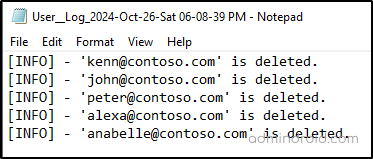
After getting confirmation for deleting or disabling the inactive accounts, a log file with the deleted or disabled accounts will be retrieved.
|
|||
|
|
|
|||
|
|
|
|||
|
|
## Microsoft 365 Reporting Tool
|
|||
|
|
Seeking more in-depth reporting? [AdminDroid Microsoft 365 reporting tool](https://admindroid.com/?src=GitHub) provides 1800+ comprehensive reports and 30+ outstanding dashboards to better enhance your Microsoft 365 management effectively.
|
|||
|
|
|
|||
|
|
*View users’ last logon time report in AdminDroid:* <https://demo.admindroid.com/#/1/11/reports/20388/1/20>
|
|||
|
|
|
|||
|
|
|