 bc6a246c65
* feat(deck): enhance slide deck functionality with speaker notes and navigation improvements

- Added a switch for including speaker notes in slide decks, defaulting to true.
- Updated keyboard navigation to include 'R' for resetting to the first slide.
- Implemented click navigation for half-slide transitions.
- Enhanced the deck framework to support hidden programmatic prev/next controls.
- Improved handling of file inputs in question forms to support file submissions.

This update aims to improve user experience in creating and presenting slide decks, ensuring better accessibility and functionality.

* feat(artifacts): enforce semantic naming for user-facing deliverables

- Updated guidelines to require semantic filenames derived from user briefs for new artifacts, moving away from defaulting to `index.html`.
- Enhanced documentation to clarify naming conventions for HTML files, emphasizing the use of descriptive names like `investor-pitch-deck.html`.
- Adjusted prompts and hints across the system to reflect these changes, ensuring consistency in user-facing outputs.
- Improved test coverage to validate the new naming conventions and ensure proper implementation in various contexts.

This update aims to enhance clarity and usability in project file management, promoting better organization and user experience.

* feat(file-viewer): enhance speaker notes display and improve file workspace functionality

- Updated the speaker notes section to include a styled placeholder for empty notes, improving user experience.
- Changed the icon in the file workspace from "slides" to "panel-left" for better clarity.
- Introduced new sub-category filtering options in the file workspace, enhancing organization and navigation.
- Improved styling for the page creator search input and added visual feedback for loading states.

These changes aim to enhance usability and visual consistency across the file viewer and workspace components.

* test(web): align workspace tests with pages switcher

* test(e2e): open design files through pages menu

* fix(deck): keep source mode reachable

* fix(workspace): restore uploaded file tabs

* feat(deck-thumbnail): implement virtualized thumbnail rail for improved performance

- Introduced a new `DeckThumbnailRail` component to optimize the rendering of deck thumbnails, reducing memory usage and improving load times.
- Enhanced the `FileViewer` to integrate the new thumbnail rail, allowing for lazy loading of thumbnails based on viewport visibility.
- Added tests for the `DeckThumbnailRail` to ensure correct functionality and caching behavior.
- Updated styles for better visual consistency and performance during thumbnail rendering.

These changes aim to enhance user experience by providing a smoother and more efficient way to navigate through deck slides.

* feat(deck): enhance deck rendering with thumbnail support and keyboard shortcuts

- Integrated `DeckSlideThumbnail` for rendering individual slides in a shadow root, improving performance and reducing main-thread load.
- Updated `DeckThumbnailRail` to utilize the new thumbnail component, allowing for efficient slide navigation.
- Implemented keyboard shortcuts for deck navigation, enhancing user experience during presentations.
- Added tests for `buildDeckRenderInput` to ensure proper functionality of the deck stage fallback.
- Improved styling for loading states in the viewer, providing a smoother visual experience.

These changes aim to optimize the deck viewing experience by reducing resource consumption and enhancing interactivity.

* feat(deck): improve thumbnail loading and speaker notes editing experience

- Refactored `DeckSlideThumbnail` to enhance loading states with a new shimmer effect, improving visual feedback during thumbnail rendering.
- Updated `DeckThumbnailRail` to manage loading states for thumbnails, ensuring a smoother user experience.
- Simplified the speaker notes editing interface by removing the toggle switch, allowing direct editing from the notes body.
- Enhanced accessibility by adding roles and focus states to speaker notes elements.
- Added tests to verify the new loading states and speaker notes functionality.

These changes aim to optimize the user experience in deck navigation and speaker notes management, providing a more intuitive and responsive interface.

* feat(file-viewer): enhance version export functionality and speaker notes interaction

- Introduced new export options for file versions, including PDF and image formats, improving the ability to download and share content.
- Implemented a streamlined process for exporting version content, with progress indicators and error handling for a better user experience.
- Enhanced speaker notes editing by refining event handling to prevent unintended focus shifts, ensuring a smoother editing experience.
- Updated styles for improved visual consistency in the file version download interface.
- Added tests to verify the functionality of version exports and speaker notes interactions.

These changes aim to optimize the file viewer's usability and enhance the overall experience when managing and exporting project files.

* fix(web): polish export menus and creator filters

* fix(file-viewer): fall back to preview exports

* test(file-viewer): cover version export fallbacks

* test(file-viewer): assert loading skeleton by role

* fix(file-viewer): restore html source mode affordance

* fix(file-viewer): capture full version fallback snapshots

* docs: trim slides handoff eof

* test(exports): cover full preview snapshot requests

* test(file-viewer): account for snapshot options arg

* refactor(file-viewer, file-workspace): streamline export functions and enhance page creator dialog visibility

* test(file-workspace): enhance slide template creation and mock plugin responses

* feat(export): add support for versioned exports and enhance HTML export functionality

* feat(export): implement versioned export support across multiple formats and enhance related tests

* feat(file-viewer): enhance manual edit functionality with commit sequence tracking and add test for inline text session saving

* style(speaker-notes): update filmstrip and thumb-frame styles for improved responsiveness and add corresponding tests

* feat(file-viewer): enhance comment composer functionality with portal metrics and improve draw toolbar layout for mobile views

* feat(analytics): track slide deck viewing experience

Add analytics for the new deck/slides experience introduced in this PR:
the deck viewer surface, in-deck slide navigation, thumbnail rail, and
speaker-notes authoring. Presentation entry stays on the existing
present_popover click to avoid double-counting.

- contracts: DeckViewerSurfaceViewProps (surface_view),
  DeckViewerClickProps (ui_click), SpeakerNotesSaveResultProps
  (new speaker_notes_save_result event), wired into the event unions.
- web: track* wrappers + fire helpers in FileViewer — deck_viewer
  surface_view on deck mount, slide_prev/next/reset, thumbnail_select,
  thumbnail_rail_toggle (expand/collapse), speaker_notes_edit, and
  speaker_notes_save_result (preview + presenter surfaces).
- tests: deck analytics suite asserting the emitted (event, props) pairs.

Co-Authored-By: Claude Opus 4.8 <noreply@anthropic.com>

* feat(file-viewer, file-workspace): enhance export toast functionality and improve localization for page creation

* feat(home-view, plugins-home-section, agent-skill): update default facet preference, enhance category selection handling, and improve localization support

- Set `preferDefaultFacet` to true in HomeView component for better user experience.
- Introduced `handlePickCategory` function in PluginsHomeSection to manage category selection based on card layout visibility.
- Updated PRIMARY_CATEGORIES to reflect the new order and added localization for titles and descriptions in adaptAgentSkill.
- Enhanced tests to verify the correct handling of display copy and tags from SKILL frontmatter.

* feat(plugins-home, file-workspace): introduce commercial category labels and enhance deck handling

- Added a new module for resolving and localizing commercial category labels for plugins.
- Updated the FileWorkspace and PluginCard components to display the commercial category label on deck cards.
- Enhanced the PageCreatorPresetFrame to adjust frame classes based on deck presets.
- Refactored subcategory handling in facets to align with the new commercial category taxonomy.
- Improved localization support for new category labels across multiple languages.

* feat(deck-preview): implement deck preview scaling and enhance home hero layout

- Introduced `useDeckPreviewScale` hook to manage scaling of deck previews within a fixed 1280×720 logical viewport, ensuring proportional rendering across various templates.
- Updated `FileWorkspace`, `HomeHero`, and `PluginCard` components to utilize the new scaling functionality for improved visual consistency.
- Enhanced the layout of the home hero section to accommodate new subtype chips and descriptions, including a "More" dropdown for overflow handling.
- Improved localization support for new UI elements across multiple languages.

* fix(PreviewModal): clarify sidebar prop documentation and update test description

- Updated the documentation for the `PreviewSidebar` interface to specify that the sidebar's stage-edge handles are not shown when the sidebar prop is absent.
- Modified the test suite description for `PreviewModal` to be more concise and relevant.

* test(e2e): select prototype visual card

---------

Co-authored-by: free666799 <293857035+free666799@users.noreply.github.com>
Co-authored-by: Claude Opus 4.8 <noreply@anthropic.com>
html-ppt — HTML PPT Studio
A world-class AgentSkill for producing professional HTML presentations in 36 themes, 15 full-deck templates, 31 page layouts, 47 animations (27 CSS + 20 canvas FX), and a true presenter mode with pixel-perfect previews + speaker script + timer — all pure static HTML/CSS/JS, no build step.
Author: lewis <sudolewis@gmail.com> License: MIT 中文文档: README.zh-CN.md
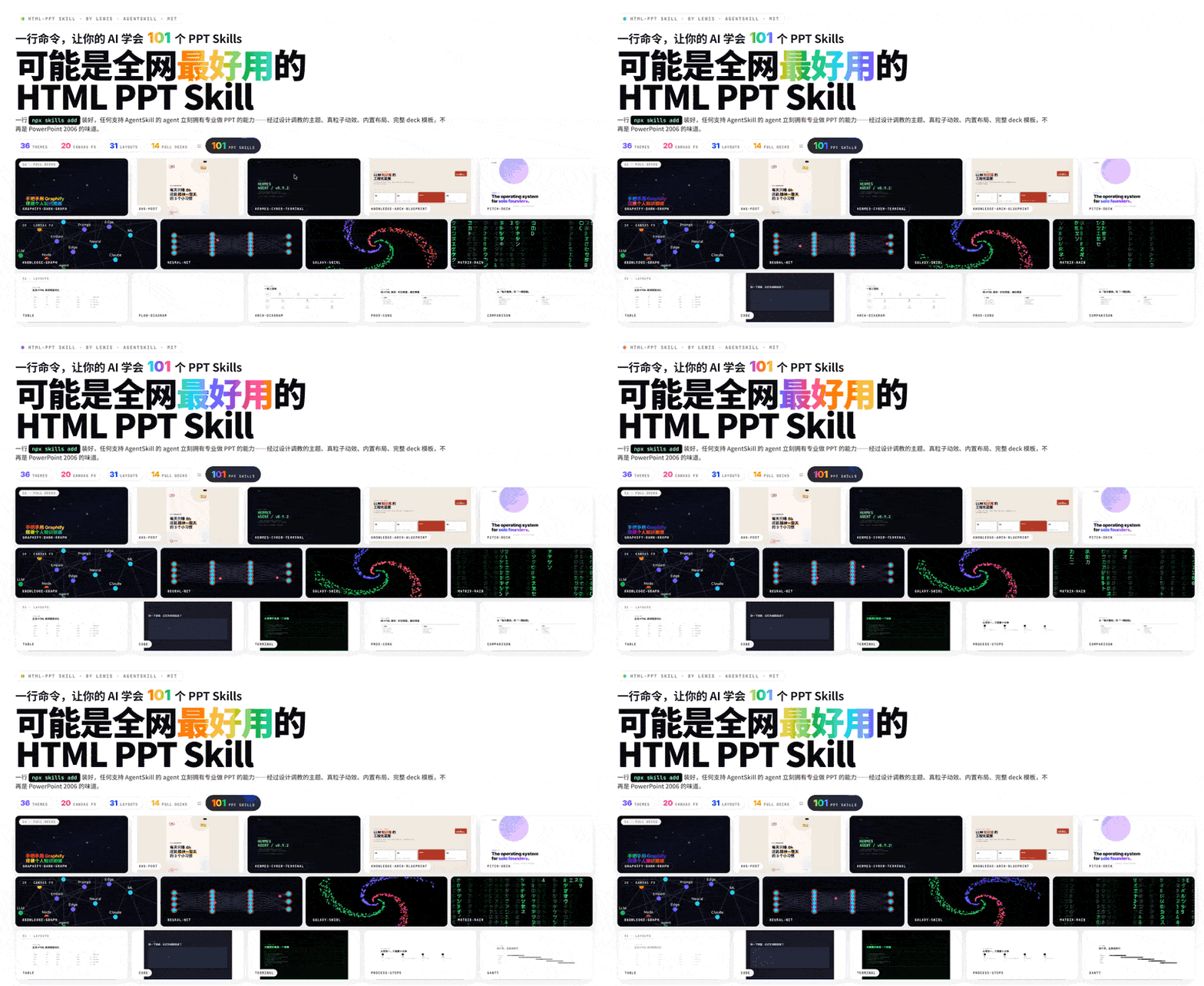
One command installs 36 themes × 20 canvas FX × 31 layouts × 15 full decks + presenter mode. Every preview above is a live iframe of a real template file rendering inside the deck — no screenshots, no mock-ups.
🎤 Presenter Mode (new!)
Press S on any deck to pop open a dedicated presenter window with four
draggable, resizable magnetic cards: current slide, next slide preview,
speaker script (逐字稿), and timer. Two windows stay in sync via
BroadcastChannel.

Why previews are pixel-perfect: each card is an <iframe> that loads the
same deck HTML with a ?preview=N query param. The runtime detects this and
renders only slide N with no chrome — so the preview uses the same CSS,
theme, fonts and viewport as the audience view. Colors and layout are
guaranteed identical.
Smooth (no-reload) navigation: on slide change, the presenter window
sends postMessage({type:'preview-goto', idx:N}) to each iframe. The iframe
just toggles .is-active between slides — no reload, no flicker.
Speaker script rules (3 golden):
- Prompt signals, not lines to read — bold the keywords, separate transition sentences into their own paragraphs
- 150–300 words per slide — that's the ~2–3 min/page pace
- Write it like you speak — conversational, not written prose
See references/presenter-mode.md for the
full authoring guide, or copy the ready-made template at
templates/full-decks/presenter-mode-reveal/ which ships with full 150-300
word speaker scripts on every slide.
Install (one command)
npx skills add https://github.com/lewislulu/html-ppt-skill
That registers the skill with your agent runtime. After install, any agent that supports AgentSkills can author presentations by asking things like:
"做一份 8 页的技术分享 slides,用 cyberpunk 主题" "turn this outline into a pitch deck" "做一个小红书图文,9 张,白底柔和风"
What's in the box
| Count | Where | |
|---|---|---|
| 🎤 Presenter mode | NEW | S key / ?preview=N |
| 🎨 Themes | 36 | assets/themes/*.css |
| 📑 Full-deck templates | 15 | templates/full-decks/<name>/ |
| 🧩 Single-page layouts | 31 | templates/single-page/*.html |
| ✨ CSS animations | 27 | assets/animations/animations.css |
| 💥 Canvas FX animations | 20 | assets/animations/fx/*.js |
| 🖼️ Showcase decks | 4 | templates/*-showcase.html |
| 📸 Verification screenshots | 56 | scripts/verify-output/ |
36 Themes
minimal-white, editorial-serif, soft-pastel, sharp-mono, arctic-cool,
sunset-warm, catppuccin-latte, catppuccin-mocha, dracula, tokyo-night,
nord, solarized-light, gruvbox-dark, rose-pine, neo-brutalism,
glassmorphism, bauhaus, swiss-grid, terminal-green, xiaohongshu-white,
rainbow-gradient, aurora, blueprint, memphis-pop, cyberpunk-neon,
y2k-chrome, retro-tv, japanese-minimal, vaporwave, midcentury,
corporate-clean, academic-paper, news-broadcast, pitch-deck-vc,
magazine-bold, engineering-whiteprint.

Each is a pure CSS-tokens file — swap one <link> to reskin the entire deck.
Browse them all in templates/theme-showcase.html (each slide rendered in an
isolated iframe so theme ≠ theme is visually guaranteed).

15 Full-deck templates
Eight extracted from real-world decks, seven generic scenario scaffolds:
Extracted looks
xhs-white-editorial— 小红书白底杂志风graphify-dark-graph— 暗底 + 力导向知识图谱knowledge-arch-blueprint— 蓝图 / 架构图风hermes-cyber-terminal— 终端 cyberpunkobsidian-claude-gradient— 紫色渐变卡testing-safety-alert— 红 / 琥珀警示风xhs-pastel-card— 柔和马卡龙图文dir-key-nav-minimal— 方向键极简
Scenario decks
pitch-deck,product-launch,tech-sharing,weekly-report,xhs-post(9-slide 3:4),course-module,presenter-mode-reveal🎤 — complete talk template with full 150-300 word speaker scripts on every slide, designed around theSkey presenter mode
Each is a self-contained folder with scoped .tpl-<name> CSS so multiple
decks can be previewed side-by-side without collisions. Browse the full
gallery in templates/full-decks-index.html.

31 Single-page layouts
cover · toc · section-divider · bullets · two-column · three-column · big-quote · stat-highlight · kpi-grid · table · code · diff · terminal · flow-diagram · timeline · roadmap · mindmap · comparison · pros-cons · todo-checklist · gantt · image-hero · image-grid · chart-bar · chart-line · chart-pie · chart-radar · arch-diagram · process-steps · cta · thanks
Every layout ships with realistic demo data so you can drop it into a deck and immediately see it render.

The big iframe is loading templates/single-page/<name>.html directly and cycling through all 31 layouts every 2.8 seconds.

27 CSS animations + 20 Canvas FX
CSS (lightweight) — directional fades, rise-in, zoom-pop, blur-in,
glitch-in, typewriter, neon-glow, shimmer-sweep, gradient-flow,
stagger-list, counter-up, path-draw, morph-shape, parallax-tilt,
card-flip-3d, cube-rotate-3d, page-turn-3d, perspective-zoom,
marquee-scroll, kenburns, ripple-reveal, spotlight, …
Canvas FX (cinematic) — particle-burst, confetti-cannon, firework,
starfield, matrix-rain, knowledge-graph (force-directed physics),
neural-net (signal pulses), constellation, orbit-ring, galaxy-swirl,
word-cascade, letter-explode, chain-react, magnetic-field,
data-stream, gradient-blob, sparkle-trail, shockwave,
typewriter-multi, counter-explosion. Each is a real hand-rolled canvas
module auto-initialised on slide enter via fx-runtime.js.
Quick start (manual, after install or git clone)
# Scaffold a new deck from the base template
./scripts/new-deck.sh my-talk

# Browse everything
open templates/theme-showcase.html         # all 36 themes (iframe-isolated)
open templates/layout-showcase.html        # all 31 layouts
open templates/animation-showcase.html     # all 47 animations
open templates/full-decks-index.html       # all 14 full decks

# Render any template to PNG via managed Chromium
./scripts/render.sh templates/theme-showcase.html
./scripts/render.sh examples/my-talk/index.html 12
Keyboard cheat sheet
← → Space PgUp PgDn Home End   navigate
F                               fullscreen
S                               open presenter window (magnetic cards)
N                               quick notes drawer (bottom)
R                               reset timer (in presenter window)
O                               slide overview grid
T                               cycle themes (syncs to presenter)
A                               cycle a demo animation on current slide
#/N (URL)                       deep-link to slide N
?preview=N (URL)                preview-only mode (single slide, no chrome)
Project structure
html-ppt-skill/
├── SKILL.md                      agent-facing dispatcher
├── README.md                     this file
├── references/                   detailed catalogs
│   ├── themes.md                 36 themes with when-to-use
│   ├── layouts.md                31 layout types
│   ├── animations.md             27 CSS + 20 FX catalog
│   ├── full-decks.md             14 full-deck templates
│   └── authoring-guide.md        full workflow
├── assets/
│   ├── base.css                  shared tokens + primitives
│   ├── fonts.css                 webfont imports
│   ├── runtime.js                keyboard + presenter + overview
│   ├── themes/*.css              36 theme token files
│   └── animations/
│       ├── animations.css        27 named CSS animations
│       ├── fx-runtime.js         auto-init [data-fx] on slide enter
│       └── fx/*.js               20 canvas FX modules
├── templates/
│   ├── deck.html                 minimal starter
│   ├── theme-showcase.html       iframe-isolated theme tour
│   ├── layout-showcase.html      all 31 layouts
│   ├── animation-showcase.html   47 animation slides
│   ├── full-decks-index.html     14-deck gallery
│   ├── full-decks/<name>/        14 scoped multi-slide decks
│   └── single-page/*.html        31 layout files with demo data
├── scripts/
│   ├── new-deck.sh               scaffold
│   ├── render.sh                 managed Chromium → PNG
│   └── verify-output/            56 self-test screenshots
└── examples/demo-deck/           complete working deck
Philosophy
- Token-driven design system. All color, radius, shadow, font decisions
live in
assets/base.css+ the current theme file. Change one variable, the whole deck reflows tastefully. - Iframe isolation for previews. Theme / layout / full-deck showcases all
use
<iframe>per slide so each preview is a real, independent render. - Zero build. Pure static HTML/CSS/JS. CDN only for webfonts, highlight.js and chart.js (optional).
- Senior-designer defaults. Opinionated type scale, spacing rhythm, gradients and card treatments — no "Corporate PowerPoint 2006" vibes.
- Chinese + English first-class. Noto Sans SC / Noto Serif SC pre-imported.
License
MIT © 2026 lewis <sudolewis@gmail.com>.