2. Modify the template files and `CLAUDE.md` to your liking. `.claude/settings.json` needs to install Terminal-Notifier for macOS https://github.com/centminmod/terminal-notifier-setup. If you're not using macOS, you can remove `.claude/settings.json`.
4. Optional step highly recommended: Install Visual Studio Code ([beginners YouTube video guide](https://www.youtube.com/watch?v=rPITZvwyoMc) and [here](https://www.youtube.com/watch?v=P-5bWpUbO60)) and [Claude Code VSC Extension](https://marketplace.visualstudio.com/items?itemName=anthropic.claude-code).
5. Optional step highly recommended: Sign up for [Github.com](https://github.com/) account and install Git for Visual Studio Code. Checkout YouTube guides [here](https://www.youtube.com/watch?v=twsYxYaQikI) and [here](https://www.youtube.com/watch?v=z5jZ9lrSpqk).
The Claude Code hook is for `STOP` which uses Terminal-Notifier to show macOS desktop notifications whenever Claude Code stops and finishes it's response https://github.com/centminmod/terminal-notifier-setup.
Claude Code subagents are specialized tools designed to handle complex, multi-step tasks autonomously. A key benefit of Claude Code subagents is that uses its own context window separate from the main conversation and can use it's own custom prompt. Learn more about [subagents in the official documentation](https://docs.anthropic.com/en/docs/claude-code/sub-agents).
- **Purpose**: Synchronizes memory bank documentation with actual codebase state, ensuring architectural patterns in memory files match implementation reality
- **Purpose**: A specialized agent for efficiently searching the codebase, finding relevant files, and summarizing code. Supports both standard detailed analysis and optional [Chain of Draft (CoD)](https://github.com/centminmod/or-cli/blob/master/examples/example-code-inspection-prompts3.md) ultra-concise mode when explicitly requested for 80% token reduction
- Chain of Draft (CoD) mode for ultra-concise reasoning with minimal tokens
- **Usage**: Use when you need to locate specific functions, classes, or logic within the codebase. Request "use CoD", "chain of draft", or "draft mode" for ultra-concise responses with ~80% fewer tokens
- **Standard mode**: "Find the payment processing code" → Full detailed analysis
- **CoD mode**: "Find the payment processing code using CoD" → "Payment→glob:*payment*→found:payment.service.ts:45"
- **Purpose**: Simple DateTime utility for accurate Brisbane, Australia (GMT+10) timezone values. Executes bash date commands and returns only the raw output without formatting or explanations
- **Purpose**: Comprehensive UX/UI design guidance specialist combining user experience optimization, premium interface design, and scalable design systems with Tailwind CSS and Highcharts data visualization
- Premium UI design with sophisticated visual hierarchies
- Scalable design systems architecture using Tailwind CSS
- Data visualization strategy with Highcharts implementations
- Accessibility compliance and performance optimization
- Component library design with atomic methodology
- **Usage**: Use for dashboard UX improvements, premium component libraries, complex user flow optimization, design system creation, or any comprehensive UX/UI design guidance needs
- Example generated report for `/secure-prompts .claude/commands/security/test-examples/test-encoding-attacks.md` [here](reports/secure-prompts/security-analysis_20250719_072359.md)
If you are using Claude monthly subscription plans for Claude Code, new weekly rate limits will apply from August 28, 2025 in addition to max 50x 5hr session limits per month:
> Configure Claude Code with global and project-level settings, and environment variables.
Claude Code offers a variety of settings to configure its behavior to meet your needs. You can configure Claude Code by running the `/config` command when using the interactive REPL.
The `settings.json` file is our official mechanism for configuring Claude
Code through hierarchical settings:
* **User settings** are defined in `~/.claude/settings.json` and apply to all
projects.
* **Project settings** are saved in your project directory:
*`.claude/settings.json` for settings that are checked into source control and shared with your team
*`.claude/settings.local.json` for settings that are not checked in, useful for personal preferences and experimentation. Claude Code will configure git to ignore `.claude/settings.local.json` when it is created.
| `apiKeyHelper` | Custom script, to be executed in `/bin/sh`, to generate an auth value. This value will generally be sent as `X-Api-Key`, `Authorization: Bearer`, and `Proxy-Authorization: Bearer` headers for model requests | `/bin/generate_temp_api_key.sh` |
| `cleanupPeriodDays` | How long to locally retain chat transcripts (default: 30 days) | `20` |
| `env` | Environment variables that will be applied to every session | `{"FOO": "bar"}` |
| `includeCoAuthoredBy` | Whether to include the `co-authored-by Claude` byline in git commits and pull requests (default: `true`) | `false` |
| `permissions` | See table below for structure of permissions. | |
| `allow` | Array of [permission rules](/en/docs/claude-code/iam#configuring-permissions) to allow tool use | `[ "Bash(git diff:*)" ]` |
| `deny` | Array of [permission rules](/en/docs/claude-code/iam#configuring-permissions) to deny tool use | `[ "WebFetch", "Bash(curl:*)" ]` |
| `additionalDirectories` | Additional [working directories](iam#working-directories) that Claude has access to | `[ "../docs/" ]` |
| `defaultMode` | Default [permission mode](iam#permission-modes) when opening Claude Code | `"acceptEdits"` |
| `disableBypassPermissionsMode` | Set to `"disable"` to prevent `bypassPermissions` mode from being activated. See [managed policy settings](iam#enterprise-managed-policy-settings) | `"disable"` |
Claude Code supports the following environment variables to control its behavior:
<Note>
All environment variables can also be configured in [`settings.json`](#available-settings). This is useful as a way to automatically set environment variables for each session, or to roll out a set of environment variables for your whole team or organization.
| `ANTHROPIC_API_KEY` | API key sent as `X-Api-Key` header, typically for the Claude SDK (for interactive usage, run `/login`) |
| `ANTHROPIC_AUTH_TOKEN` | Custom value for the `Authorization` and `Proxy-Authorization` headers (the value you set here will be prefixed with `Bearer `) |
| `ANTHROPIC_CUSTOM_HEADERS` | Custom headers you want to add to the request (in `Name: Value` format) |
| `ANTHROPIC_MODEL` | Name of custom model to use (see [Model Configuration](/en/docs/claude-code/bedrock-vertex-proxies#model-configuration)) |
| `ANTHROPIC_SMALL_FAST_MODEL` | Name of [Haiku-class model for background tasks](/en/docs/claude-code/costs) |
| `ANTHROPIC_SMALL_FAST_MODEL_AWS_REGION` | Override AWS region for the small/fast model when using Bedrock |
| `BASH_DEFAULT_TIMEOUT_MS` | Default timeout for long-running bash commands |
| `BASH_MAX_TIMEOUT_MS` | Maximum timeout the model can set for long-running bash commands |
| `BASH_MAX_OUTPUT_LENGTH` | Maximum number of characters in bash outputs before they are middle-truncated |
| `CLAUDE_BASH_MAINTAIN_PROJECT_WORKING_DIR` | Return to the original working directory after each Bash command |
| `CLAUDE_CODE_API_KEY_HELPER_TTL_MS` | Interval in milliseconds at which credentials should be refreshed (when using `apiKeyHelper`) |
| `CLAUDE_CODE_IDE_SKIP_AUTO_INSTALL` | Skip auto-installation of IDE extensions (defaults to false) |
| `CLAUDE_CODE_MAX_OUTPUT_TOKENS` | Set the maximum number of output tokens for most requests |
| `CLAUDE_CODE_USE_BEDROCK` | Use [Bedrock](/en/docs/claude-code/amazon-bedrock) |
| `CLAUDE_CODE_USE_VERTEX` | Use [Vertex](/en/docs/claude-code/google-vertex-ai) |
| `CLAUDE_CODE_SKIP_BEDROCK_AUTH` | Skip AWS authentication for Bedrock (e.g. when using an LLM gateway) |
| `CLAUDE_CODE_SKIP_VERTEX_AUTH` | Skip Google authentication for Vertex (e.g. when using an LLM gateway) |
| `CLAUDE_CODE_DISABLE_NONESSENTIAL_TRAFFIC` | Equivalent of setting `DISABLE_AUTOUPDATER`, `DISABLE_BUG_COMMAND`, `DISABLE_ERROR_REPORTING`, and `DISABLE_TELEMETRY` |
| `DISABLE_AUTOUPDATER` | Set to `1` to disable automatic updates. This takes precedence over the `autoUpdates` configuration setting. |
| `DISABLE_BUG_COMMAND` | Set to `1` to disable the `/bug` command |
| `DISABLE_COST_WARNINGS` | Set to `1` to disable cost warning messages |
| `DISABLE_ERROR_REPORTING` | Set to `1` to opt out of Sentry error reporting |
| `DISABLE_NON_ESSENTIAL_MODEL_CALLS` | Set to `1` to disable model calls for non-critical paths like flavor text |
| `DISABLE_TELEMETRY` | Set to `1` to opt out of Statsig telemetry (note that Statsig events do not include user data like code, file paths, or bash commands) |
| `HTTP_PROXY` | Specify HTTP proxy server for network connections |
| `HTTPS_PROXY` | Specify HTTPS proxy server for network connections |
| `MAX_THINKING_TOKENS` | Force a thinking for the model budget |
| `MCP_TIMEOUT` | Timeout in milliseconds for MCP server startup |
| `MCP_TOOL_TIMEOUT` | Timeout in milliseconds for MCP tool execution |
| `MAX_MCP_OUTPUT_TOKENS` | Maximum number of tokens allowed in MCP tool responses (default: 25000) |
| `VERTEX_REGION_CLAUDE_3_5_HAIKU` | Override region for Claude 3.5 Haiku when using Vertex AI |
| `VERTEX_REGION_CLAUDE_3_5_SONNET` | Override region for Claude 3.5 Sonnet when using Vertex AI |
| `VERTEX_REGION_CLAUDE_3_7_SONNET` | Override region for Claude 3.7 Sonnet when using Vertex AI |
| `VERTEX_REGION_CLAUDE_4_0_OPUS` | Override region for Claude 4.0 Opus when using Vertex AI |
| `VERTEX_REGION_CLAUDE_4_0_SONNET` | Override region for Claude 4.0 Sonnet when using Vertex AI |
| `autoUpdates` | Whether to enable automatic updates (default: `true`). When enabled, Claude Code automatically downloads and installs updates in the background. Updates are applied when you restart Claude Code. | `false` |
| `preferredNotifChannel` | Where you want to receive notifications (default: `iterm2`) | `iterm2`, `iterm2_with_bell`, `terminal_bell`, or `notifications_disabled` |
| `theme` | Color theme | `dark`, `light`, `light-daltonized`, or `dark-daltonized` |
| `verbose` | Whether to show full bash and command outputs (default: `false`) | `true` |
[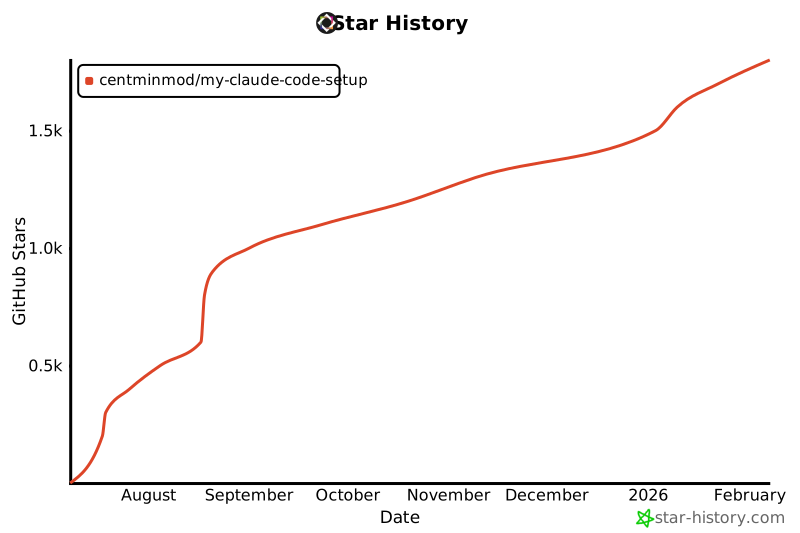](https://www.star-history.com/#centminmod/my-claude-code-setup&Date)
