2023-01-07 23:48:36 +01:00
# docker-dmarc-report  [](https://registry.hub.docker.com/u/gutmensch/dmarc-report/)
2016-12-04 19:09:27 +01:00
2018-03-31 22:42:24 +02:00
This image is intended to combine a dmarc report parser (see https://github.com/techsneeze/dmarcts-report-parser by TechSneeze.com and John Bieling) with a report viewer (see https://github.com/techsneeze/dmarcts-report-viewer/ by the same people) into a runnable docker image / microservice.
2017-02-11 15:22:31 +01:00
2018-03-31 22:42:24 +02:00
It fetches dmarc report mails regularly from an IMAP server, stores them into a MySQL DB and visualizes them via Webserver/PHP module.
## Howto
2023-01-07 23:04:11 +01:00
1. Create a \_dmarc.example.com TXT DNS record for your domain, containg an IMAP postbox, e.g.
```bash
2019-01-04 17:19:57 +01:00
17:18 $ dig TXT _dmarc.schumann.link +short
"v=DMARC1\; p=quarantine\; fo=1\; rua=mailto:dmarc@schumann .link\; ruf=mailto:dmarc@schumann .link\; adkim=s\; aspf=s\;"
```
2023-01-07 23:04:11 +01:00
1. Create a MySQL Database and a user for this service
1. Run this docker image with below mentioned env vars
1. Access port 80 on the container (or 443) or put it behind a reverse proxy to view reports
```bash
2018-03-31 19:40:29 +02:00
docker pull gutmensch/dmarc-report
2018-04-01 13:19:29 +02:00
docker run -e ... -ti gutmensch/dmarc-report
2016-12-04 19:18:45 +01:00
```
2018-03-31 21:47:10 +02:00
2020-04-13 16:50:30 +02:00
New dmarc reports will be fetched every 15 minutes past the hour, every hour. Therefore it can take up to one hour for the first report to be fetched.
2023-01-07 23:04:11 +01:00
## Versions for last build latest and docker image tag 1.4
2018-04-01 13:19:29 +02:00
2024-02-04 23:44:22 +01:00
dmarcts report viewer: 2024-02-04
2023-01-07 23:04:11 +01:00
2024-02-04 23:44:22 +01:00
dmarcts report parser: 2024-02-04
2021-07-04 13:30:09 +02:00
2022-07-28 14:36:53 -07:00
CAUTION: The old gutmensch/dmarc-report:latest image (older alpine, php5, etc.) is available still as gutmensch/dmarc-report:0.5. The current latest (and 1.0) uses the latest alpine version, newer MySQL client libraries, newer OpenSSL, etc. and improves compatibilitiy with MySQL 8+.
2018-03-31 21:47:10 +02:00
2020-11-22 16:50:37 +01:00
## Frontend Screenshot
2023-01-07 23:04:11 +01:00
2020-11-22 16:50:37 +01:00

2018-03-31 22:42:24 +02:00
## Sample docker compose / Environment variables
2023-01-07 23:04:11 +01:00
2024-08-27 18:23:15 +02:00
Make sure to create the IMAP-Folders for processed and error reports before the cron job runs!
2020-04-13 16:50:30 +02:00
2024-08-27 18:23:15 +02:00
The default foldernames are are [`error` ](examples/env.example ) & [`processed` ](examples/env.example ) but they can be changed within the [`env-file` ](examples/env.example ).
2023-01-07 23:04:11 +01:00
2024-08-27 18:23:15 +02:00
Make sure to rename the [`env.example` ](examples/env.example ) file to `.env` and adjust the values to your needs.
You can find templates for both, [`postgreql` ](examples/docker-compose.postgres.yml )
and [`mysql` ](examples/docker-compose.mysql.yml )
db in the [`examples` ](examples ) directory. Just rename the setup you want to use to `docker-compose.yml` .
## Manual update
If you are using the docker-compose file above, you can use this command to trigger an manual update. It will fetch the latest reports and parse them.
```bash
docker compose exec dmarc-report /usr/bin/dmarcts-report-parser.pl -i -d -r=1
2018-03-31 22:42:24 +02:00
```
2019-01-04 11:40:31 -08:00
## Optional extended configuration
2023-01-07 23:04:11 +01:00
2025-02-12 20:07:14 +01:00
For further optional configuration see the docker-compose [`env-file` ](examples/env.example ).
2023-04-07 12:12:53 +02:00
## Contributors
< img src = "./CONTRIBUTORS.svg" >
## Stargazers over time
[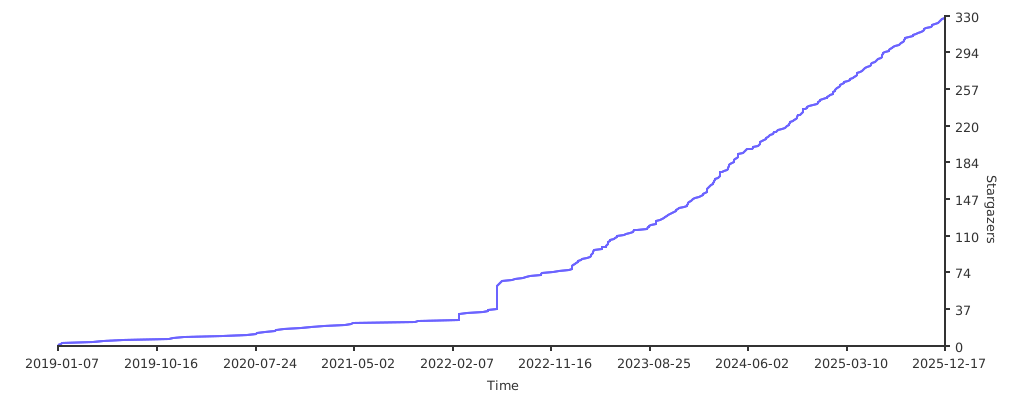](https://starchart.cc/gutmensch/docker-dmarc-report)
