 Taylor HoandGitHub
d8281b9c93
Taylor HoandGitHub
d8281b9c93
**Category:** new-feature **User Impact:** Mobile users must confirm with Face ID, biometrics, or their device passcode before sending their Buzz identity to Desktop. **Problem:** A signed-in phone could send its full identity, including the `nsec`, to a desktop without fresh local verification. **Solution:** Require OS device authentication before opening the identity-recovery scanner, retain that authorization only for the active pairing session and short pairing window, and require fresh authentication again if it expires before the identity payload is sent. Normal app opening, identity import, and community removal remain unchanged. ## Screencasts | Enable Face ID | Use Face ID | | --- | --- | | 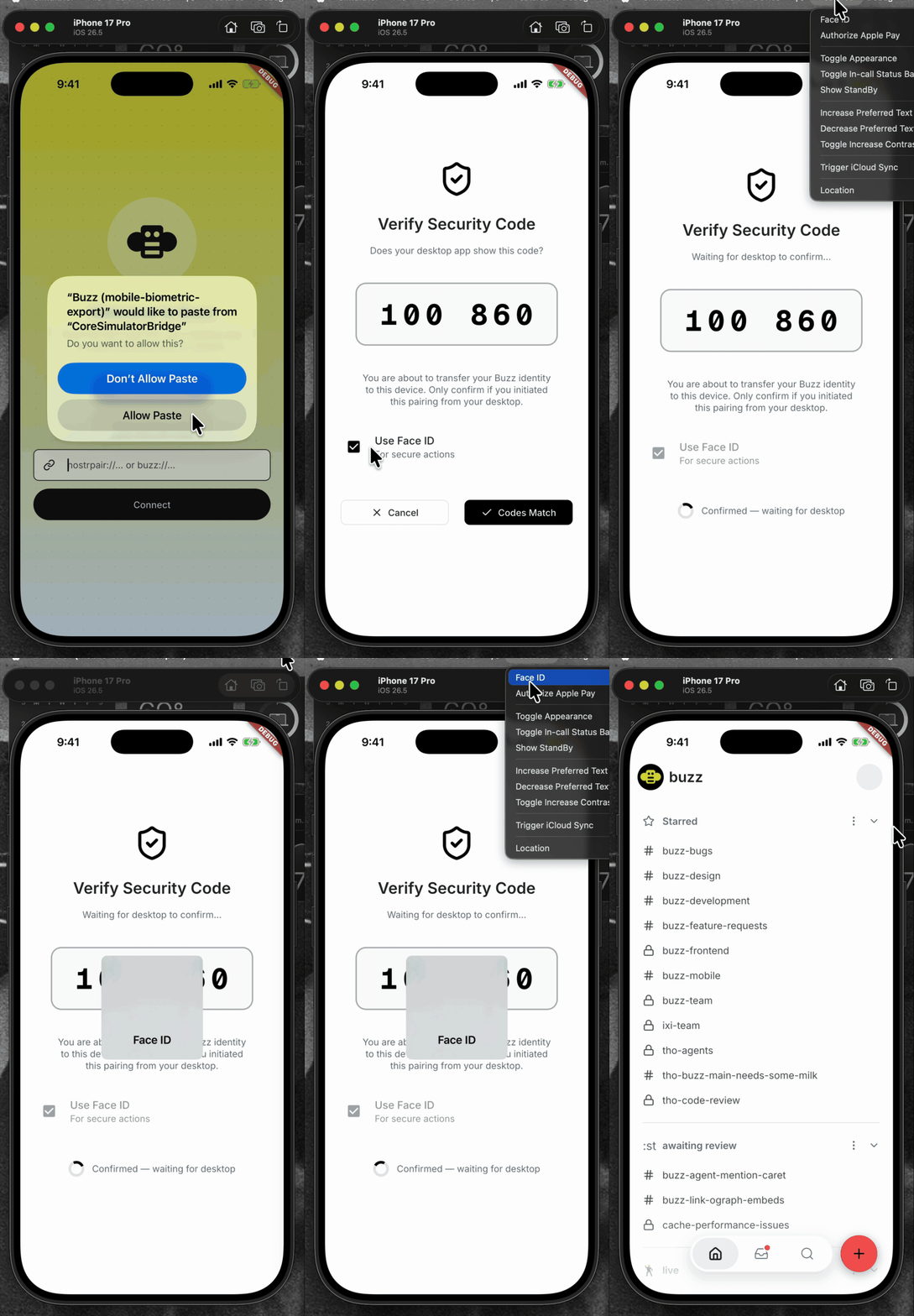 | 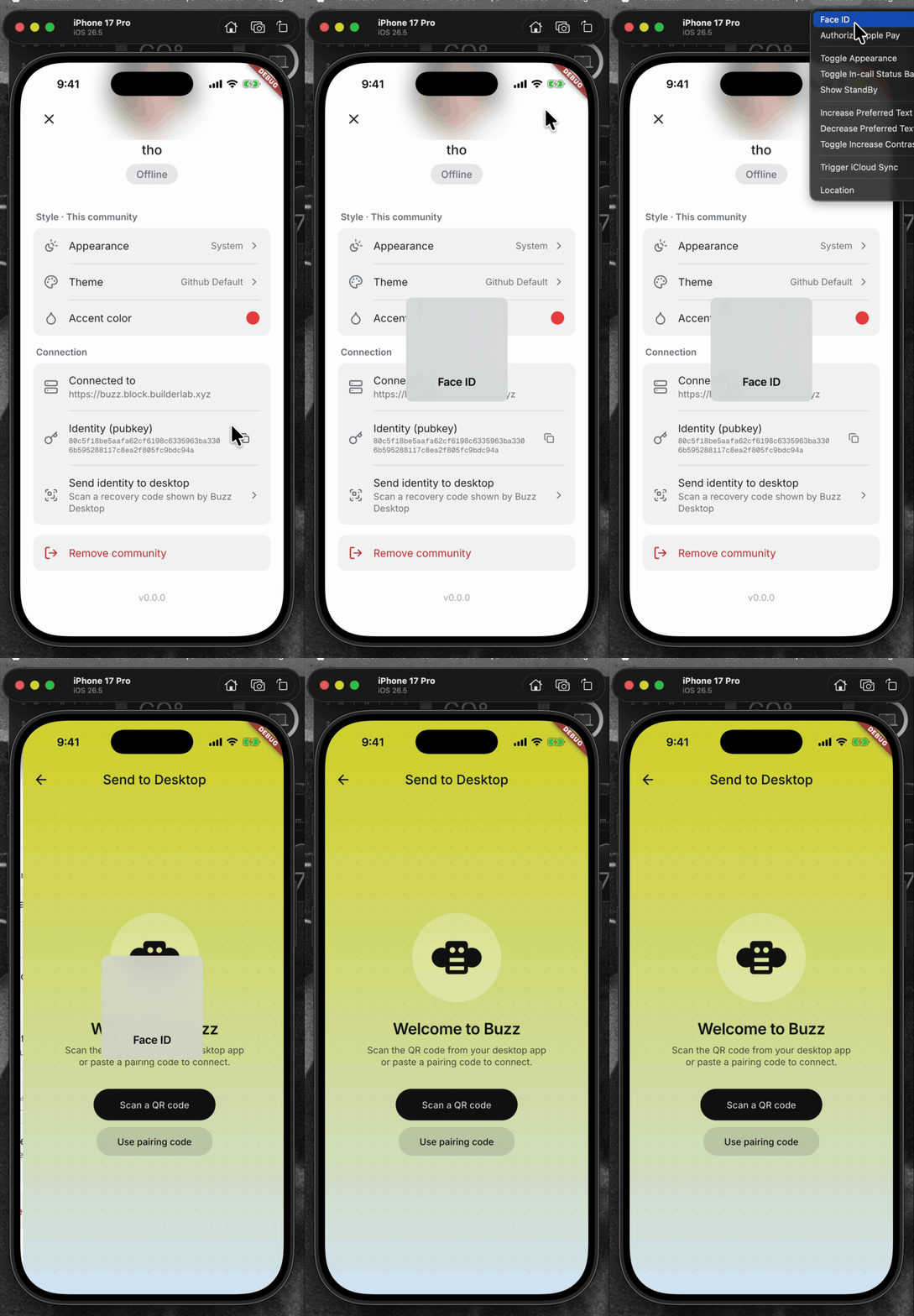 | <details> <summary>File changes</summary> **Android and iOS integration** - `mobile/android/app/build.gradle.kts` declares the AppCompat dependency required by the biometric activity theme. - `mobile/android/app/src/main/kotlin/xyz/block/buzz/mobile/MainActivity.kt` uses the activity type required by the system authentication prompt. - `mobile/android/app/src/main/res/values/styles.xml` and `mobile/android/app/src/main/res/values-night/styles.xml` use the compatible launch theme. - `mobile/ios/Podfile.lock` records the native local-authentication dependency. - `mobile/ios/Runner/Info.plist` explains why Buzz requests Face ID access. **Identity policy and pairing flow** - `mobile/lib/shared/security/sensitive_action_authorizer.dart` wraps OS authentication and maps platform errors to stable app-level outcomes. - `mobile/lib/shared/community/community.dart` and `mobile/lib/shared/community/community_storage.dart` persist the sensitive-action policy. - `mobile/lib/features/invites/invite_join_provider.dart` assigns the explicit policy for invite-created communities. - `mobile/lib/features/pairing/pairing_provider.dart` gates export, binds grants to the active community/session, reauthenticates expired grants, and clears grants on every terminal path. - `mobile/lib/features/pairing/pairing_page.dart` lets users choose biometric protection while importing an identity. - `mobile/lib/features/settings/settings_page.dart` wires pairing into settings. - `mobile/lib/features/settings/settings_page/connection_section.dart` authenticates before opening export recovery and bounds the foreground-resume wait. - `mobile/pubspec.yaml` and `mobile/pubspec.lock` add and lock `local_auth`. **Coverage** - `mobile/test/shared/security/sensitive_action_authorizer_test.dart` covers native result mapping, unsupported devices, and single-flight behavior. - `mobile/test/shared/community/community_test.dart` and `mobile/test/shared/community/community_storage_test.dart` cover policy defaults and persistence. - `mobile/test/features/invites/invite_join_provider_test.dart` covers the invite policy. - `mobile/test/features/pairing/pairing_page_test.dart` covers import protection controls. - `mobile/test/features/pairing/pairing_provider_test.dart` covers export/import authorization, stale/reset/concurrent guards, malformed payload cleanup, and no-export failure paths. - `mobile/test/features/settings/connection_section_test.dart` covers the tap gate, lifecycle resume, and timeout behavior. </details> ## Reproduction steps 1. Pair an identity into the mobile app. 2. Open Settings and choose “Send identity to desktop.” 3. Verify Face ID, biometrics, or the device passcode is required before the recovery scanner opens. 4. Cancel device authentication and verify the scanner does not open and no identity transfer begins. 5. Authenticate, scan a Desktop recovery code, confirm the SAS, and verify the identity transfer completes. ## Validation At `be5620f5f10aa6cc16e86a4f01f102f3d9aeef9b`: - `cd mobile && ../bin/flutter analyze` — no issues - `cd mobile && ../bin/flutter test` — 1,368 tests passed - `cd mobile/android && JAVA_HOME=$(/usr/libexec/java_home -v 21) ./gradlew app:assembleDebug` — debug APK assembled successfully --------- Signed-off-by: Taylor Ho <taylorkmho@gmail.com>


Buzz Mobile
Flutter mobile client for Buzz.
Setup
cd mobile
flutter pub get
Run
# From repo root (recommended — starts Docker, relay, and simulator):
just mobile-dev

# Direct (requires services and relay already running):
cd mobile && flutter run
Worktree-aware debug identity
Debug builds produced from a git worktree get a unique app identifier keyed
to the worktree directory name (com.buzz.buzzMobile.<slug> on iOS,
xyz.block.buzz.mobile.<slug> on Android) plus a display-only branch label
in the app name (Buzz (my-branch), or a short SHA when the worktree is
detached). Because the identifier follows the directory rather than the
branch, one worktree keeps exactly one installed app — and its login state —
across branch switches, and builds from multiple worktrees install side by
side, mirroring the desktop dev experience. Release and profile builds
always keep the production identity and name.
just mobile-dev and just mobile-build-android apply this automatically by
running scripts/mobile-worktree-overrides.sh, which writes two gitignored
files:
mobile/ios/Flutter/WorktreeOverrides.xcconfig(included by Debug builds only; a developer'sAppOverrides.xcconfigis included after it, so app-specific overrides like a personalBUNDLE_IDENTIFIERfor device signing always win)mobile/android/worktree.properties(read by the debug build type only)
For direct Xcode / Android Studio / flutter run development, run
./scripts/mobile-worktree-overrides.sh from the repo root once per branch
switch to refresh the display label (the install identity never changes);
the persisted files are then picked up by any subsequent build. In the main
checkout the script is a no-op that removes stale override files, restoring
the plain Buzz identity.
To remove leftover worktree-suffixed installs from booted iOS simulators and
connected Android emulators, run just mobile-clean (add --dry-run via
./scripts/mobile-worktree-clean.sh --dry-run to preview). Production
installs are never touched.
Checks
dart format --output=none --set-exit-if-changed .
flutter analyze
flutter test
Or from the repo root: just mobile-check and just mobile-test.
Android release signing
Android release builds fail unless all upload-key inputs are supplied through the environment:
BUZZ_ANDROID_UPLOAD_KEYSTORE_PATH: path to a CI-vended keystore fileBUZZ_ANDROID_UPLOAD_KEYSTORE_PASSWORDBUZZ_ANDROID_UPLOAD_KEY_ALIASBUZZ_ANDROID_UPLOAD_KEY_PASSWORD
The keystore path must be absolute, and the keystore must remain outside the repository. Development and debug builds do not require these variables.
Release pipelines that sign through the central APK Signer service instead of
a local upload keystore must set BUZZ_ANDROID_RELEASE_SIGNING=external. That
mode produces an unsigned release bundle and refuses to run if any
BUZZ_ANDROID_UPLOAD_* value is also set.
Architecture
lib/
├── main.dart              # Entry point, Riverpod bootstrap
├── app.dart               # MaterialApp with theme
├── shared/
│   └── theme/             # Catppuccin light/dark, spacing tokens, extensions
└── features/
    └── home/              # Placeholder home surface
- State management: Riverpod + Hooks (
HookConsumerWidget) - Theme: Catppuccin Latte (light) / Macchiato (dark) — matches desktop
- Spacing:
Gridtokens for consistent spacing - Linting:
flutter_lints+riverpod_lintviacustom_lint - Feature isolation: No cross-feature imports except
shared/