**Category:** improvement
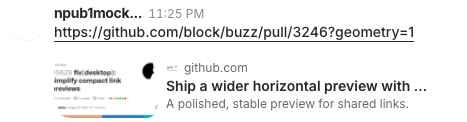
**User Impact:** Compact link previews now use a single-line title and
smaller thumbnail, making conversations easier to scan.
**Problem:** Compact previews gave long titles and oversized thumbnails
too much visual weight in the message timeline.
**Solution:** Keep titles to one ellipsized line and reduce image
thumbnails to a 104×64 treatment while preserving the existing wide
aspect ratio; Rich previews remain unchanged.
<details>
<summary>File changes</summary>
**desktop/src/shared/ui/compact-link-preview-attachment.tsx**
Tightens the Compact presentation with a single-line title and smaller
wide thumbnail, leaving Rich previews untouched.
**desktop/tests/e2e/messaging.spec.ts**
Adds focused coverage for title overflow, exact 64px card and 104×64
thumbnail geometry, and successful decoded-image rendering using a
realistic fixture, plus an optional visual capture.
**desktop/tests/fixtures/github-pr-5629-og.png**
Provides realistic visible image bytes for the compact-preview
image-rendering E2E path.
</details>
## Reproduction steps
1. Launch the desktop app with link preview style set to Compact.
2. Send a link whose preview has an image and a long title.
3. Confirm the thumbnail renders at the smaller wide size and the title
truncates to one line with an ellipsis.
4. Switch link preview style to Rich and confirm its presentation is
unchanged.
## Screenshot
---------
Signed-off-by: Taylor Ho <taylorkmho@gmail.com>
Co-authored-by: Carl <acda9e433d19dcd0e6b6840f7f4b98f3a56f1fab98049d444c087019e6d36560@buzz.block.builderlab.xyz>

